Anyone building a website in Rawalpindi or Islamabad eventually runs into the term plugin, usually while trying to add a contact form or speed up a slow site. What is plugin in website come up constantly for beginners trying to add features without writing code from scratch.
A plugin is essentially a small software add-on that extends what a website can do. This guide explains the plugin definition, how plugins actually work, and which types matter most for a functional, well-performing site.
Plugin Definition
To define a plugin simply, it’s a piece of software that adds specific functionality to a website without requiring changes to the site’s core code. Instead of building a contact form, a security system, or an SEO tool from scratch, a plugin installs that feature directly, ready to use within minutes.
Most content management systems, WordPress being the most common example, rely heavily on plugins to extend basic functionality. A default WordPress installation handles content publishing well, but plugins add nearly everything else, e-commerce capability, contact forms, caching, and security scanning.
Why Use a Plugin?
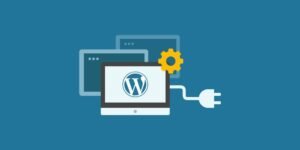
Plugins exist because most website owners aren’t developers, and hiring one for every small feature adds up fast in cost and time. Installing a plugin instead means adding complex functionality in minutes rather than weeks.
This matters a lot for small businesses across Pakistan, from a local shop in Rawalpindi setting up online orders for the first time to a service business in Islamabad adding a booking calendar. Plugins essentially hand real customization power to business owners with zero coding background, which is a large part of why platforms built around them have grown so widely used.
Read More: Is SEO Part of Web Development?
The Structure of a WordPress Plugin
WordPress plugins typically follow a consistent structure behind the scenes, even though most users never see it directly. Each plugin includes a main file containing basic information, the plugin’s name, version, and author, along with the actual functional code that makes it work.
Plugins hook into WordPress through specific connection points, allowing them to add features without altering WordPress’s core files directly. This separation matters because it means updates to WordPress itself, or to the plugin, generally don’t break the site’s foundation. A well-built plugin integrates smoothly, while a poorly coded one can slow a site down or create conflicts with other installed plugins, something local developers in Islamabad frequently get called in to troubleshoot.
What Are the Different Types of Plugins?
Plugins generally fall into several broad categories, each serving a distinct purpose.
- SEO plugins — help optimize content, meta descriptions, and site structure for search engine visibility
- Security plugins — scan for vulnerabilities, block malicious login attempts, and monitor suspicious activity
- Caching plugins — improve site speed by storing simplified versions of pages for faster loading
- Contact form plugins — add customizable forms without requiring custom code
- E-commerce plugins — turn a standard site into a functional online store with cart and checkout capability
- Backup plugins — automatically save site data in case something needs restoring after an error or attack
Examples of plugins in each category include tools most website owners eventually install as their site grows, an SEO plugin early on, followed by caching and security tools once traffic increases.
Importance of Plugins in Web Development and SEO
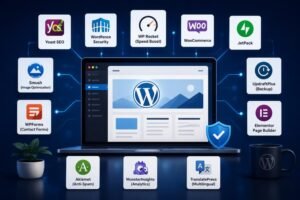
Plugins play a direct role in how well a website performs in search results, not just how it functions day to day. An SEO plugin helps structure meta titles, descriptions, and sitemaps correctly, details that directly affect how search engines crawl and rank a site.
Site speed also connects directly to plugins meaning in wordpress circles as a performance issue, not just a technical one. A slow site loses visitors and ranks lower, and caching plugins address that problem directly without requiring a full technical rebuild. Security plugins matter just as much, since a hacked or compromised site can lose search rankings entirely, sometimes for weeks, while the issue gets resolved.
How to Choose the Right Plugins for a Website
Not every plugin is worth installing, and choosing carefully protects both site performance and security.
Checking a plugin’s update history matters more than people expect. A plugin that hasn’t been updated in over a year often signals it’s no longer actively maintained, which increases security risk significantly. Reading reviews and checking the number of active installations also helps gauge reliability, a plugin used by millions of sites with strong reviews is generally safer than one with minimal adoption. Avoiding plugin overload matters too, installing too many at once can slow a site down and create conflicts between plugins trying to control the same feature.
Common Plugin Mistakes Beginners Make
A few recurring mistakes cause real problems for website owners just getting started with plugins.
Installing plugins from unverified sources outside the official WordPress repository introduces real security risk, since these often lack proper vetting. Leaving unused, deactivated plugins installed rather than deleting them entirely still leaves potential vulnerabilities on the site. Skipping regular plugin updates is another common issue, since outdated plugins are one of the most frequent entry points for website hacks. Businesses working with a local developer in Rawalpindi or Islamabad often avoid these mistakes simply by having someone manage updates and plugin choices consistently.
Conclusion
What is plugin in website ultimately comes down to functionality, plugins let a site do more without requiring custom code for every single feature. From SEO and security to speed and e-commerce, choosing the right plugins shapes how well a website actually performs. LocalPro1 Institute offers a Web development course in Rawalpindi that covers exactly this kind of practical, hands-on skill. Contact LocalPro1 Institute today to start learning web development the right way.
FAQs
What is the plugin definition in simple terms?
A plugin is a piece of software that adds specific features to a website without changing its core code.
What are some common examples of plugins?
Common examples of plugins include SEO tools, security scanners, caching software, contact form builders, and e-commerce add-ons.
Are WordPress plugins free to use?
Many WordPress plugins are free, though premium versions with additional features are also widely available.
Can too many plugins slow down a website?
Yes, installing too many plugins can slow load times and create conflicts, so only actively used plugins should stay installed.
Do plugins affect a website’s SEO performance?
Yes, plugins meaning in wordpress often ties directly to SEO, since tools like SEO and caching plugins directly influence search rankings and site speed.