AI can automate parts of web development. Replacing an entire profession is a different matter. Creating websites involves more than just writing code. Developers need to understand what the project is trying to achieve, pick the tools to handle data, solve strange bugs and make sure user information is safe. They also have to explain what they are doing to clients and to people on the team.
The US Bureau of Labor Statistics predicts 5% growth in jobs for web developers and digital designers between 2025 and 2035. It also says that AI could have an impact on how many jobs are available. These numbers are about the US market, not every country.
What Is WordPress?
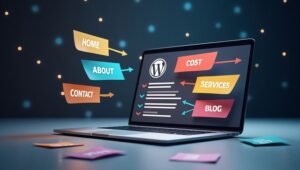
WordPress is a free and open-source content management system. A content management system allows you to create, edit and put website content without having to deal with all the code yourself.
WordPress began as a way to make blogs. Now works for many different kinds of websites. You can use themes to set the look of a website and plugins to bring in tools. For instance a contact form plugin lets people send messages through your website.
There are two choices: WordPress.org and WordPress.com. WordPress.org gives you software that you can put on your hosting. WordPress.com is a hosted service that comes with plans and features. Your decision has an effect on your expenses, your ability to make changes and the work you need to do to keep things running.
What Is WordPress Used For?

WordPress can support kinds of websites. WordPress’s design and plugin system help people build websites that match their own goals.
1. Creating Business Websites
Businesses use WordPress to share their services, company details, opening hours and contact information. A plumbing company for example can create service pages display customer reviews. Let visitors request quotes. It’s a way to connect with customers and show what the business offers.
2. Starting a Blog
Bloggers use WordPress to publish articles, guides, news and personal stories. Categories and tags help readers find posts. Bloggers can also schedule articles. Manage several writers from one dashboard.
3. Building Online Stores
WordPress can power stores through WooCommerce. WordPress store owners can display products, manage orders, accept supported payment methods and set shipping options. WordPress makes it useful for businesses selling clothes, electronics, crafts or digital products.
4. Creating Portfolio Websites
Designers, photographers, writers and developers use WordPress to show their work. A portfolio can include project images, case studies, client feedback and contact details. This helps potential clients review your skills before hiring you.
5. Developing Educational Websites
Schools, tutors, and training centers can use WordPress to share course details, lessons, and learning materials. Suitable plugins can add student accounts, quizzes, paid courses, and progress tracking.
6. Building Membership Websites
Membership websites provide chosen content to registered users giving members access. For example a fitness coach can give workout plans to paying members ensuring each member receives guidance. Plugins can handle access, subscriptions and member accounts securing each member’s data and access.
7. Creating Booking Websites
Service providers can use WordPress to manage appointment bookings and reservations. Service providers have seen salons where Service providers let customers pick a service choose a time and submit their details online. Service providers will notice that the booking features depend on the tools and setup that Service providers choose.
What Are the Main Benefits of Using WordPress?
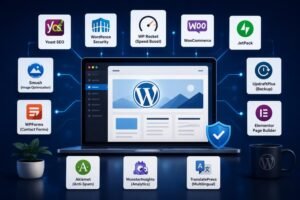
WordPress offers several useful benefits for website owners.
- Easy content management: You can edit pages and publish articles through its dashboard.
- Flexible design: Themes help you change your website’s look without starting from scratch.
- Extra features: Plugins can add forms, galleries, online payments, and booking tools.
- SEO options: You can edit page titles, URLs, headings, and image alt text.
- Room to grow: You can start with a small site and add features later.
- Community support: Tutorials, forums, and documentation help users solve common problems.
Official WordPress documentation explains its built-in publishing tools, themes, plugins, and developer features. Read the WordPress features guide for more details.
What Are the Limitations of WordPress?
WordPress is flexible. WordPress still requires careful attention. Knowing WordPress limits helps me make choices. First website owners must protect their sites. Outdated software, passwords and unsafe plugins can create security risks. Regular updates, backups and trusted extensions help reduce these risks.
Second, many plugins or poor hosting can slow a website. I recommend choosing a host, removing unused plugins and testing page speed. Some advanced features also need coding skills or paid tools. If your website needs functions you may need help from a developer.
Is WordPress Free to Use?
WordPress is flexible. WordPress still requires attention. Knowing WordPress limits helps me make choices. First website owners must protect their sites. Outdated software, passwords and unsafe plugins can create security risks. Regular updates, backups and trusted extensions help reduce these risks.
Second, many plugins or poor hosting can slow a website. I recommend choosing a host, removing plugins and testing page speed. Some advanced features also need coding skills or paid tools. If your website needs functions you may need help from a developer.
Is WordPress Good for SEO?
Yes, WordPress provides useful features for search engine optimization (SEO). You can create clear URLs, organize content with headings, add image alt text, and publish helpful articles.SEO plugins such as Yoast SEO and Rank Math offer extra tools for titles, meta descriptions, and other page settings. However, installing a plugin does not guarantee higher rankings.
Your content must answer user questions and provide accurate information. Fast loading pages, mobile-friendly design, useful internal links, and a good user experience also matter.
How to Start Using WordPress
Follow these steps to build your first WordPress website:
- Choose your platform: Decide whether WordPress.org or WordPress.com fits your needs.
- Select a domain: Pick a short, clear name that suits your website.
- Set up hosting: If you choose self-hosted WordPress, select a suitable hosting provider.
- Install WordPress: Follow your host’s setup instructions.
- Choose a theme: Select a design that works well on mobile devices.
- Create essential pages: Add your homepage, About page, services, and Contact page.
- Install useful plugins: Add only the features your website needs.
- Test before launch: Check links, forms, page speed, and mobile display.
Start with the features you need today. You can add more as your website grows.
Should You Learn WordPress for a Career?
Learning WordPress can help you build websites for businesses, clients, and your own projects. Career options include WordPress developer, website designer, WooCommerce specialist, and freelance website creator.
Start by learning the dashboard, themes, plugins, and page design. Then study HTML, CSS, basic PHP, website security, and SEO. Build sample websites to show potential clients what you can do.
If you want guided training, explore WordPress Courses in Rawalpindi at LocalPro1 Institute. Link this phrase to your relevant course page so interested learners can find details about the training.
AI tools can also help with routine coding and website tasks. Questions such as “will AI replace web developers,” “will web development be replaced by AI,” and “will AI take web developer jobs” reflect real career concerns. Learning WordPress alongside coding, problem-solving, and AI tools can help you prepare for changing work needs.
Conclusion
What Is WordPress Used For? WordPress is used to create blogs, business websites, online stores, portfolios, educational platforms, and many other types of websites. Its themes and plugins make it flexible for beginners and skilled developers alike.
The best way to learn is to build a real project. Start with a simple website, practice managing its content, and add features as needed. With regular practice, you can use WordPress for personal projects, business growth, or a web development career. Contact LocalPro1 Institute today to explore our WordPress courses and take the first step toward building your skills.
FAQs
What is WordPress mainly used for?
WordPress is mainly used to create and manage websites, including blogs, business sites, online stores, portfolios, and educational platforms.
Can I use WordPress for free?
Yes, the WordPress.org software is free. You may still pay for hosting, a domain name, premium themes, or extra features.
Is WordPress good for beginners?
Yes, beginners can create and manage websites using its dashboard, themes, and plugins. Advanced customization may require coding skills.
Can WordPress be used for e-commerce?
Yes, WooCommerce can turn a WordPress website into an online store where you manage products, orders, payments, and shipping.
Do I need coding skills to use WordPress?
No, basic websites can be built without coding. HTML, CSS, and PHP become useful when you need custom designs or advanced features.
Is WordPress good for business websites?
Yes, businesses can use WordPress to display services, share company information, collect inquiries, publish articles, and attract potential customers.