
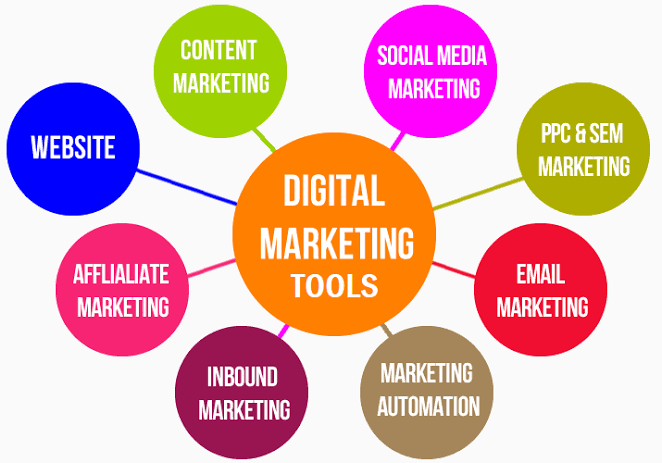
Digital marketing tools are software programs, platforms, and online services that help businesses promote products, reach customers, and track performance. They handle tasks like social media posts, email campaigns, search optimization, and web traffic analysis automatically. These systems save time, lower operational costs, and make marketing campaigns easy to manage for teams.
Whether you run a small local business or manage a large online store, understanding what are digital marketing tools helps you select software that grows your brand. Today, almost every growth strategy relies on smart software to reach the right buyers online.
What Are Digital Marketing Tools?
At their core, digital marketing tools are software solutions built to plan, execute, and monitor online promotion efforts. Instead of manually emailing customers or checking website visits, these tools automate repetitive work and collect valuable performance data.
Marketers rely on online marketing tools to run ads, write content, build landing pages, and schedule social posts. These applications turn raw data into simple charts so you can see what brings in sales. Understanding what are digital marketing tools allows business owners to save hours each week while running better campaigns.
Why Are Digital Marketing Tools Important?
Modern promotion requires fast decisions and clear data. Without software, tracking how many people clicked your ad or read your blog post is nearly impossible.
Here are the main reasons why tools used for digital marketing matter:
Save time through automation: Send welcome emails, schedule social posts, and update customer lists automatically.
Track real results: See exact numbers for website traffic, sales conversions, and cost per click.
Understand your audience: Discover buyer ages, locations, interests, and browsing habits.
Improve campaign ROI: Identify weak ads quickly so you stop spending money on tactics that do not convert.
Keep teams organized: Store assets, project timelines, and performance reports in one central place.
Types of Digital Marketing Tools
Online promotional platforms cover many business needs. Categorizing them helps you build a balanced tech stack without buying unnecessary software.
Search Engine Optimization (SEO) Tools
SEO applications help websites rank higher on Google search results. They find high-traffic keywords, track keyword rankings, check backlink profiles, and audit technical site errors.
Social Media Management Platforms
These platforms let you schedule posts across Facebook, Instagram, LinkedIn, and TikTok from one dashboard. They also monitor social comments, direct messages, and brand mentions in real time.
Content Marketing and Design Software
Creating graphics, blog posts, and videos requires user-friendly software. Modern graphic design apps and writing assistants help non-designers produce clean media quickly.
Email Marketing Systems
Email platforms help you send newsletters, nurture sales leads, and set up automated drip sequences. They track open rates, click rates, and subscriber growth effortlessly.
Analytics and Data Dashboards
Analytics platforms show how users interact with your website. They report total page views, bounce rates, traffic sources, and checkout drop-off points.
Paid Advertising Tools
Ad platforms manage campaigns across search engines, social media feeds, and third-party websites. They help set daily budgets, target audiences, and optimize cost-per-click rates.
Best Digital Marketing Tools in 2026
Selecting the best tools for digital marketing depends on your budget, team size, and goals. Here are leading platforms used by industry professionals in 2026.
Google Analytics 4 and Google Search Console
Google offers free analytics and site health monitoring. Google Analytics 4 tracks user journeys across websites and apps, while Search Console reports organic search performance and index issues.
Ahrefs and Semrush
These all-in-one SEO platforms provide keyword research, competitor analysis, site audits, and rank tracking. They show what keywords your competitors rank for and where they earn backlinks.
Mailchimp and Klaviyo
Mailchimp offers simple email creation for beginners. Klaviyo excels in e-commerce, offering deep integration with online storefronts to trigger personalized SMS and email messages.
Canva and Adobe Express
Canva makes graphic design simple with thousands of pre-made templates for social media, banners, and flyers. Adobe Express provides quick photo editing and design features for social creators.
HubSpot Marketing Hub
HubSpot combines CRM features, email marketing, landing page builders, and lead management into one centralized platform. It works well for scaling businesses that need aligned sales and marketing teams.
Buffer and Hootsuite
Buffer provides clean, simple social media scheduling at a low price point. Hootsuite offers deep social listening, team collaboration, and advanced analytics for growing brands.
Free vs Paid Digital Marketing Tools
Choosing between free options and paid subscriptions depends on your current business scale and monthly budget.
Free internet marketing tools offer essential features suitable for new websites and solo entrepreneurs. Platforms like Google Search Console, Canva Free, and Buffer Free give you a strong foundation without financial risk. However, free tools often limit monthly reporting, data exports, and user seats.
Paid marketing software unlocks full features, historical data, automated workflows, and dedicated customer support. Investing in paid plans makes sense once your business earns predictable revenue and needs deeper insights to scale up operations.
How to Choose the Right Digital Marketing Tools
With thousands of software options available, selecting the right software stack requires a simple evaluation process.
Define your core marketing goals: Identify whether you need more organic traffic, better email sales, or faster social growth.
Set a realistic monthly budget: Calculate how much you can spend on software subscriptions without straining cash flow.
Test user interfaces: Pick tools with simple dashboards that your team can learn without weeks of training.
Check software integrations: Ensure your new application connects smoothly with your existing website and CRM.
Evaluate customer support: Look for responsive email support, active user communities, and helpful tutorial documentation.
Which Digital Marketing Tools Should Beginners Start With?
Beginners often feel overwhelmed by complex enterprise software. Starting with simple, user-friendly tools builds confidence while delivering fast results.
For Analytics: Install Google Analytics 4 and Google Search Console to learn basic traffic reporting.
For Graphic Design: Use Canva to create clean social media graphics and promotional banners.
For Email Marketing: Sign up for Mailchimp’s free tier to send monthly newsletters and build your subscriber list.
For Social Media: Use Buffer to schedule weekly posts across two primary social accounts.
Mastering these basic platforms helps you understand what are digital marketing tools before upgrading to paid enterprise software.
Common Mistakes When Choosing Marketing Tools
Many business owners waste money on software by falling into standard purchasing traps.
Buying too many tools at once: Subscribing to ten applications simultaneously creates confusion and wastes budget on unused features.
Ignoring team training: Purchasing software without teaching your team how to use it leads to low adoption rates.
Focusing on features over usability: Choosing complex tools with hundreds of features you do not need makes daily work slower.
Skipping free trials: Failing to test software during free trial periods often results in paying for apps that do not fit your workflow.
Future of Digital Marketing Tools
Marketing software continues to improve through smart automation, machine learning, and generative AI features.
Modern applications now suggest post ideas, write draft copy, segment email lists, and adjust ad bids automatically. AI-assisted search tools help marketers optimize content for conversational search engines and direct answer engines. As software becomes smarter, marketers will spend less time on manual data entry and more time on high-level strategy and creative storytelling.
Conclusion
Understanding what are digital marketing tools are empowers you to select the best platforms for your growth goals. Using reliable digital marketing tools simplifies daily operations, improves campaign ROI, and helps you connect with qualified buyers online. Start with simple free tools, track your performance data, and upgrade your software stack as your business expands.
If you want to master these software platforms hands-on, enroll in a comprehensive digital marketing course in Rawalpindi offered by LocalPro1 Institute. Acquiring practical skills through structured training ensures you use software effectively and achieve long-term career success.
Frequently Asked Questions
What are digital marketing tools used for?
Digital marketing tools are used to create campaigns, schedule social media posts, analyze web traffic, send automated emails, and optimize content for search engines.
Can beginners use digital marketing tools without coding skills?
Yes, most modern online marketing tools feature drag-and-drop editors, pre-made templates, and simple dashboards designed for non-technical users.
How many tools should a small business use?
A small business typically needs 3 to 5 core tools: an analytics tool, an email platform, a social media scheduler, a design app, and a basic SEO application.
Are free digital marketing tools enough for growing brands?
Free tools work well for early-stage sites, but growing brands usually need paid plans to access advanced analytics, team seats, and automated workflows.