
SEO Practically

digital marketing services

Explore professional digital marketing services, including SEO, PPC, social media, content marketing, and web strategies to grow your business online.

SEO course cost and online learning in Pakistan

How Much Do SEO Courses Cost in Pakistan?

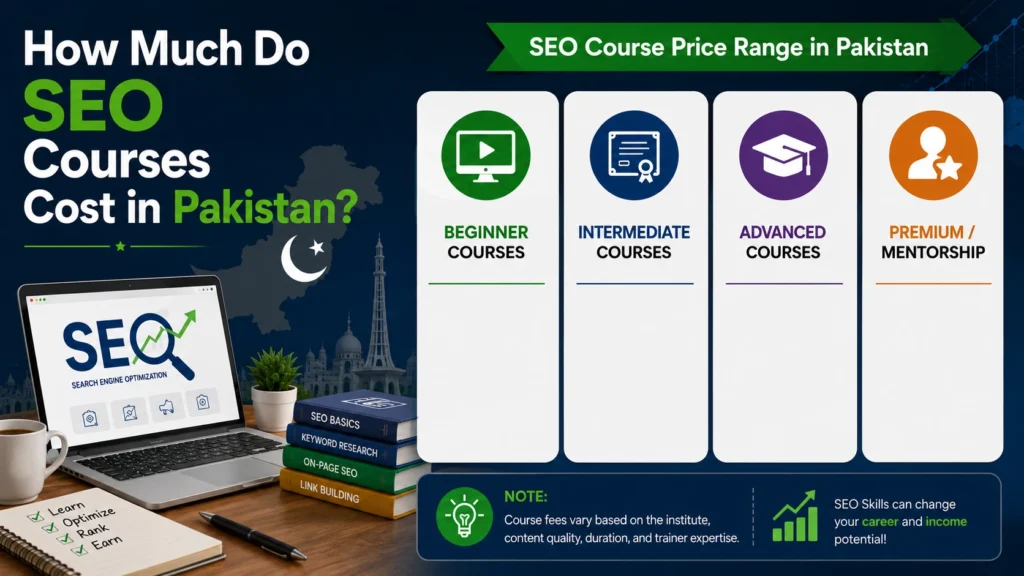
Learning SEO can open doors to jobs, freelancing, agency work, and online business. But course fees vary widely across Pakistan based on training level, duration, and support. In most cases, SEO training can cost PKR 20,000 to PKR 60,000 or more. Free options also exist, while premium programs can cost more. The right choice depends on what you need to learn. If you are comparing How Much Do SEO Courses Cost in Pakistan?, look beyond the fee. A useful course should teach practical SEO, real projects, tools, and skills you can use after training. How Much Does an SEO Course Cost in Pakistan? There is no single fixed price for SEO training in Pakistan. Institutes set their fees based on the course length, level, trainer, class format, and practical work included. A basic SEO course may cost around PKR 15,000 to PKR 25,000. A more complete professional course can range from PKR 25,000 to PKR 45,000. Advanced training may reach PKR 45,000 to PKR 60,000 or more. Free SEO courses are also available for beginners who cannot afford paid training. The important point is that a higher price does not always mean better training. You should compare the syllabus, practical work, trainer experience, tools, and student support before paying. Average SEO Course Fees in Pakistan The average SEO course fees in Pakistan depend on the type of training you choose. SEO Course Type Approximate Fee Suitable For Free SEO course PKR 0 Complete beginners Basic SEO course PKR 15,000–25,000 Students and beginners Professional SEO course PKR 25,000–45,000 Job seekers and freelancers Advanced SEO training PKR 45,000–60,000+ Professionals Private coaching Varies Learners needing personal help These figures are useful planning ranges, not fixed national prices. Course fees can change between cities and institutes. A short course may cover SEO basics but offer little project work. A longer program may include technical SEO, local SEO, content planning, link building, reporting, and practical assignments. Before joining, ask what you will actually do during the course. Learning by doing is more useful than watching lectures alone. What Factors Affect the Cost of an SEO Course? Several factors can change the SEO training course price in Pakistan. 1. Course Duration A four-week course usually costs less than a three-month program. Longer training gives the instructor more time to cover advanced topics and practical tasks. However, duration alone should not decide your choice. A focused eight-week course can be more useful than a six-month course with weak content. 2. Beginner or Advanced Level Beginner courses usually cover keywords, on-page SEO, basic technical SEO, and link building. Advanced courses may cover audits, competitor research, technical problems, international SEO, local SEO, content strategy, and SEO reporting. Advanced topics require more training time, which can increase the fee. 3. Online or Physical Classes Online courses often cost less because the institute does not need a classroom. Physical classes may cost more because they include classroom facilities and direct interaction. Choose the format that helps you learn better. A cheaper online course is not useful if you cannot stay consistent. 4. Practical Projects Courses that include live websites, assignments, SEO audits, keyword research tasks, and reporting usually offer more value. Practical work helps you build proof of your skills. It can also give you something useful to show employers or freelance clients. 5. SEO Tools Professional SEO uses tools for keyword research, website analysis, backlink checks, technical audits, and performance tracking. Some institutes teach tools such as Google Search Console, Google Analytics, Ahrefs, Semrush, and other platforms. Check whether tool access is included before enrolling. 6. Trainer Experience and Support An experienced trainer can explain real problems that textbooks often miss. Ask whether you can get feedback on your work. Regular feedback can make a major difference, especially when you are learning SEO for the first time. How Much Does an SEO Course Cost in Islamabad and Rawalpindi? SEO training prices in Islamabad and Rawalpindi vary by institute, course length, and training quality. Many learners can expect to find courses within the PKR 20,000 to PKR 50,000 range. Shorter programs may cost less, while advanced programs can cost more. For learners searching for SEO courses in Rawalpindi, LocalPro1 Institute offers SEO training in the PKR 20,000 to PKR 30,000 range. When comparing courses in Islamabad or Rawalpindi, check more than the price. Look at the course syllabus, class schedule, practical assignments, trainer support, and project work. A local course can be useful when you prefer face-to-face learning and want to ask questions during class. What Will You Learn in a Paid SEO Course? A good paid SEO course should teach skills that you can apply to a real website. Keyword Research You should learn how to find keywords based on search intent, competition, relevance, and business value. The goal is not to target keywords with high search volume only. You need keywords that match what your audience wants. On-Page SEO This includes titles, headings, URLs, internal links, image alt text, content structure, and search intent.You should also learn how to improve pages without stuffing keywords into every paragraph. Technical SEO Technical SEO covers crawling, indexing, site structure, redirects, canonical tags, mobile usability, page speed, and other website issues. You do not need to become a programmer to understand the main technical concepts. Off-Page SEO You should understand backlinks, link quality, digital PR, brand mentions, and safe link-building practices. A good course should explain why poor-quality links can create problems instead of promising thousands of backlinks. Local SEO Local SEO helps businesses appear for searches related to their services and locations. Training may cover Google Business Profile, local keywords, reviews, citations, location pages, and local content. SEO Content Modern SEO requires useful content that answers real questions clearly. Google advises publishers to create helpful, reliable, people-first content rather than content made mainly to attract search traffic. Search Console and Analytics You should learn how to check clicks, impressions, queries, indexing issues, and organic performance. These skills help you measure whether

How Much Do SEO Courses Cost in Pakistan? Read More »
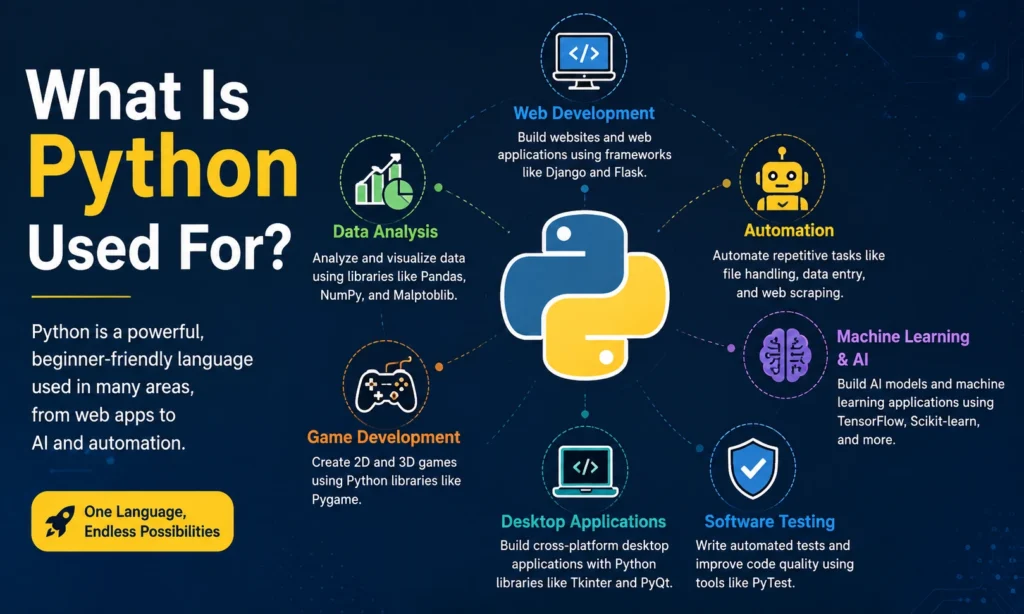
What Is Python Used For infographic showing web development, data analysis, automation, AI, game development, and software testing

What Is Python Used For?

Python powers everything from simple scripts to massive AI models running in the cloud. It’s one of the easiest languages to pick up, yet strong enough to run apps used by billions of people every day. Companies like Google, Netflix, and Instagram build core parts of their systems with it. So, what is Python used for exactly? You’ll find it in web development, data science, automation, and machine learning. This guide breaks down every major use case in plain language. What Is Python Used For? If you want a quick answer: Python is used to build websites, analyze data, automate boring tasks, train AI models, and create desktop and mobile apps. It’s a general-purpose language, which means it isn’t locked into one job. That flexibility is exactly why so many beginners and professionals ask what Python is used for before picking a language to learn. Unlike some languages built for one narrow purpose, Python adapts to almost any project you throw at it. A student can use it to build a to-do list app. A data scientist can use the same language to train a neural network. Both jobs use different tools within Python, but the core language stays the same. 10 Common Uses of Python Here are the most common uses of Python programming today, based on how companies and developers actually use it. Web development. Frameworks like Django and Flask let developers build full websites fast. Instagram and Pinterest both run parts of their platforms on Django. Data analysis. Libraries like Pandas and NumPy make it simple to clean, sort, and study large sets of data. Analysts use Python to spot trends that would take hours to find by hand. Machine learning and AI. Tools like TensorFlow and PyTorch are built on Python. Most AI research papers include Python code because the language handles complex math without extra clutter. Automation and scripting. Python scripts can rename thousands of files, scrape websites, or send automatic emails. Office workers use it to cut down repetitive tasks. Software testing. QA teams use Python to write test scripts that check if new code breaks anything before it goes live. Game development. Libraries like Pygame let developers build simple 2D games. It’s not the top choice for big-budget games, but it works well for prototypes and indie titles. Desktop applications. Tools like Tkinter and PyQt help build software with buttons, menus, and windows, the kind of programs you open on your laptop every day. Scientific computing. Universities and research labs use Python for simulations, physics models, and lab data processing. NASA has used it for mission analysis tools. Cybersecurity. Security experts write Python scripts to scan networks, test for weak spots, and automate security checks. Finance and trading. Banks and trading firms use Python to build models that predict stock movement and manage risk. These ten points cover the main applications of Python, but new use cases show up every year as the language keeps growing. Why Is Python Used So Widely? Three reasons explain most of it: simple syntax, a huge library ecosystem, and strong community support. Python code reads almost like plain English. A beginner can understand a basic script without knowing much about programming at all. This cuts the learning curve compared to languages like C++ or Java. The second reason is the library ecosystem. Instead of writing code from scratch, developers pull in ready-made tools for almost any task, whether that’s building a website or training an AI model. The third reason is community size. Python has one of the largest developer communities in the world. According to the Stack Overflow Developer Survey, Python consistently ranks among the most used and most loved languages by working developers. A big community means more tutorials, more forum answers, and faster fixes when something breaks. Is Python Good for Beginners? Yes. Python is often the first language taught in coding bootcamps and computer science courses because it removes a lot of the confusing syntax found in other languages. You don’t need semicolons at the end of every line. You don’t need to declare variable types before using them. This lets new learners focus on logic instead of memorizing rules. Most beginners can write a working program within their first week of learning Python. That quick win keeps motivation high, which matters more than people think when starting a new skill. If you’re based in Pakistan and want structured, hands-on training instead of scattered YouTube tutorials, LocalPro1 Institute offers python courses in Rawalpindi that walk you through real projects step by step. Learning with guidance from an instructor tends to save weeks compared to self-teaching alone, especially when you get stuck on an error message at 11 PM with no one to ask. What Jobs Can You Get With Python? Python skills open doors across several career paths, not just one narrow job title. Data analyst. Works with spreadsheets, databases, and Python libraries to find patterns in business data. Machine learning engineer. Builds and trains AI models used in products like recommendation systems and chatbots. Backend developer. Builds the server-side logic that powers websites and apps. Automation engineer. Writes scripts that handle repetitive tasks inside companies, from IT to finance. Data scientist. Combines statistics, coding, and business knowledge to guide company decisions. QA engineer. Writes automated tests to catch bugs before software ships. What Can You Build With Python? People often ask what Python is used to create once they’ve learned the basics. Here are real examples you can build, even as a beginner: A personal budget tracker that reads your bank statement and shows spending by category. A web scraper that pulls product prices from online stores and alerts you when they drop. A simple chatbot that answers common customer questions. A weather app that pulls live data from a public API. A basic e-commerce website using Django. A file organizer that automatically sorts your downloads folder. None of these need advanced math or years of experience. They need patience and

What Is Python Used For? Read More »

How to Learn Python and Start Freelancing in Pakistan

How to Learn Python and Start Freelancing in Pakistan?

Freelancing is growing fast in Pakistan, and more people want to know how to learn Python and start freelancing in Pakistan the right way. Python is one of the easiest languages for beginners, and it opens doors to real paid work online. From students to working professionals, more people are switching to Python because it does not demand years of study before you can earn from it. This guide breaks down every step in simple terms, from picking your first learning resource to landing your first paying client. No confusing jargon, just a clear path you can follow starting today. Why Choose Python for Freelancing Python stands out because it reads almost like plain English. You do not need a computer science degree to understand it. Beginners often write their first working program within a few hours of starting. Python freelancing in Pakistan is growing because clients trust the language for many types of work. It handles websites, automation, data tasks, and even basic AI tools. One skill, many doors. Compare that to languages that need years of practice before you can build anything useful. Python skills for freelancers pay off faster because you can start taking small paid projects while you are still learning the advanced parts. Clients on Upwork and Fiverr search for Python help almost every day. Tasks range from fixing a small script to building a full automation tool for a business. That steady demand is why so many Pakistani students and professionals are picking Python programming for freelancing over other options. Step-by-Step Roadmap to Learn Python Learning Python works best when you follow a clear order. Skipping steps often leads to confusion later. Step 1: Learn the basics. Start with variables, loops, functions, and simple data types. Spend real time here. Rushing this stage causes problems down the road. Step 2: Practice with small projects. Build a calculator. Build a to-do list app. Try a basic web scraper. Doing beats watching. Tutorials alone will not make you job ready. Step 3: Pick one specialty. Trying to learn everything at once slows you down. Choose one path first: Web development with Django or Flask Data analysis using Pandas and NumPy Automation scripts for repetitive tasks Basic AI and chatbot projects Step 4: Build real proof of your skills. Create a GitHub account. Upload your projects, even small ones. Clients want to see actual work, not just a list of skills on a profile page. Step 5: Solve a real problem. Pick a small business need, like automating a report or cleaning messy data, and build a solution for it. This kind of hands-on project shows real experience, not just theory. Best Resources to Learn Python You do not need to spend money to start. Free options like YouTube tutorials, freeCodeCamp, and the official Python documentation cover everything a beginner needs. If you learn better with structure and support, a guided course can help. LocalPro1 Institute in Rawalpindi offers hands-on training that pairs well with practical freelancing goals, including our Python Course in Rawalpindi for students who want expert guidance instead of learning alone. Whichever path you pick, consistency matters more than the resource itself. Thirty focused minutes daily beats five random hours once a week. Read More: How to Check Python Version? How to Start Freelancing in Pakistan Once you have basic skills and a small portfolio, you are ready to look for paid work. Choose your platform. Upwork, Fiverr, and People Per Hour are common starting points for freelancers in Pakistan. Each platform has its own bidding style, so try more than one before settling. Write a clear profile. Explain what problems you solve, not just what tools you know. Add your GitHub link and any small projects you have finished. Price fairly at the start. Lower rates help you win your first few jobs and collect reviews. Raise your prices once you have proof of good work behind you. Apply with purpose. Do not send the same message to every job post. Mention the client’s actual problem and how you would solve it. This small habit gets far more replies. Your first three to five projects matter more for the reviews they bring than the money. Good reviews lead to better clients later. Common Mistakes Beginners Make Many new freelancers slow their own progress without noticing. Watch out for these patterns. Trying to learn every Python topic before starting real work Staying stuck in tutorials instead of building projects Setting prices too low or too high without any track record Ignoring clear communication with clients Applying to jobs without reading the actual requirements Avoiding these mistakes alone can put you ahead of most beginners applying for the same jobs. Tips to Stand Out as a Pakistani Freelancer Competition is real, but you can still stand out with the right approach. Pick a niche instead of calling yourself a general Python developer. Focus on something specific, like automation for online stores or data cleaning for small businesses. Clients trust specialists more than generalists. Work on clear English communication. Fast, polite, and clear replies build trust quickly, sometimes faster than your code skills do. Use Pakistan’s time zone to your advantage. It overlaps well with clients in the Middle East, Europe, and parts of the United States, which makes meetings and quick replies easier to manage. Combine skills when possible. Someone who knows Python and WordPress can handle automation projects that most single-skill freelancers cannot touch. That combination alone can set you apart in a crowded market. Conclusion Learning Python and building a freelancing career in Pakistan takes real effort, but it is fully possible with steady practice. Focus on one specialty first, build actual projects, and apply what you learn to real freelance work early. If you want structured, expert-led training to speed up this process, LocalPro1 Institute offers practical courses, including our Python Course in Rawalpindi, built for students who want real skills and real results. Start today and give yourself a real

How to Learn Python and Start Freelancing in Pakistan? Read More »

How to Check Python Version

How to Check Python Version | Quick Guide

Type python version into your terminal, hit enter, and you’ve usually got your answer in under two seconds. On Windows that command sometimes needs to be py –version instead, and on Mac or Linux you’ll almost always reach for python3 –version. Simple as it sounds, this one detail trips up more beginners than it should, mostly because different systems handle Python differently. That’s really the whole problem in a nutshell. There isn’t one universal way to check python version, there are several, and picking the wrong one is why so many people end up staring at a command not found error instead of a clean answer. This guide covers every method that actually works, why checking your version matters more than it seems, and how to fix the errors that show up along the way. Why Multiple Python Versions Exist Python 2 and Python 3 don’t play nice together. Code written for one often breaks on the other, so a lot of machines still keep both around, whether anyone meant for that to happen or not. Most operating systems come with a Python version already baked in. Developers then install their own on top of it for whatever project they’re working on. Add a couple of side projects and suddenly there are three or four Python versions sitting on one laptop. That’s not a mess, that’s just how it usually goes. Tools like pyenv, conda, and Homebrew make this easier to manage. Each one lets you install several versions and switch between them without one stepping on another’s toes. Anyone juggling a few client projects at once will end up using something like this sooner or later. Understanding How to Check the Python Version There’s more than one way to do this, and which one you reach for depends on what you’re actually trying to figure out. From the Terminal or Command Prompt This is the quickest route for most people. On Windows, use one of these: python –version py –version, if the first one doesn’t respond On Mac and Linux: python3 –version Why python3 instead of plain python? Because on a lot of modern systems, python either points to an old Python 2 install or isn’t mapped to anything at all. Typing python3 skips that guesswork. There’s also a shorter flag that does the same job: python -V Either version of this python version check command gets you the same answer. From Inside a Python Script Sometimes you need the version from within your code, not from the terminal. The built in sys module handles that. import sys print(sys.version) That prints the full version string, build info included. If you just want the number, use platform instead: import platform print(platform.python_version()) This comes in handy for logging, debugging, or checking compatibility before your code runs into a wall. Inside Jupyter Notebook or Your IDE Working in Jupyter? Run !python –version in a cell and you’re done. VS Code and PyCharm go a step further and show the active interpreter right in the status bar, so half the time you won’t even need to open a terminal. Inside a Virtual Environment Virtual environments frequently run a different version than your system default, and that trips people up constantly. Activate the environment first, then check the version from inside it. What you’ll see is the version tied to that project, not whatever’s installed globally. Through Pip Need to confirm which Python your pip is actually tied to? Run: pip –version This command shows the pip version alongside the Python version behind it, which clears up a lot of confusion when packages seem to install to the wrong place. Read More: How Long Does it Take to Learn Python? What Is the Need to Check the Python Version This isn’t just a formality. It saves real time. Plenty of libraries only work with certain versions. Try installing something built for Python 3.11 on a 3.7 setup, and you’ll get errors that don’t even look version related at first. Some syntax simply doesn’t exist on older versions. F-strings, the walrus operator, structural pattern matching, none of that runs on Python releases that came before it. On team projects, a mismatched version is often the quiet cause behind bugs nobody can explain. Confirming everyone’s setup ahead of time heads that off before it starts. When deploying to a server or a cloud platform, those environments usually expect a specific version. Checking locally first keeps your local setup and production setup from drifting apart. Python Command Not Found? Find It With Autocomplete Getting a command not found error when you type python –version usually means Python isn’t on your system path. Try this instead: type python, then hit Tab. Most terminals will autocomplete or show a list of everything starting with python, things like python3 or python3.11. That alone tells you what’s actually installed, even when the plain python command refuses to cooperate. On Windows: this often comes down to the Add to PATH box during install. If it wasn’t checked, reinstall Python or add the folder to your PATH manually. On Mac: python3 is usually there by default even when python isn’t. Set up an alias in your shell config if you’d rather type the shorter command. On Linux: Python 3 is almost always preinstalled, just under the name python3. Some distributions let you install a package called python-is-python3 if you want plain python to work too. Common Python Version Issues and How to Resolve Them Multiple versions fighting for priority. When several versions are installed, your system might default to the wrong one without warning. A version manager like pyenv fixes this by letting you set defaults per project. Pip installing to the wrong place. This happens because each Python version can carry its own separate pip. Running python -m pip instead of just pip forces it to use the version you meant to use. Version looks right, code still breaks. The terminal says one thing, your IDE runs another. Check the interpreter

How to Check Python Version | Quick Guide Read More »

Can I learn web design in 3 months infographic showing HTML, CSS, JavaScript, UI UX design, and responsive web design

Can I Learn Web Design in 3 Months?

Yes, you can learn web design in three months if you study a few hours each day and stick to a focused plan. Most beginners can pick up HTML, CSS, basic UI principles, and one design tool like Figma in this time. You won’t know everything, but you’ll walk away with a real portfolio and working skills. So can I learn web design in 3 months and actually use it in the real world? Yes, if you practice daily and build real projects instead of just watching tutorials. What Is Web Design? Web design is the process of planning and building how a website looks and works. It covers layout, color, typography, images, and navigation. A good web designer thinks about how visitors feel when they land on a page, not just how it looks in a screenshot. Web design is often confused with web development. Design focuses on the look and user experience. Development focuses on the code that makes the site function. Many beginners learn both, but design is the faster skill to pick up first. Can I Learn Web Design in 3 Months? This is the question most beginners ask before they commit. The honest answer is yes, but with a condition. You need daily practice, not passive watching. Three months is enough time to learn the core tools, build five to eight real projects, and understand how layout and spacing work. What three months won’t give you is deep mastery. You won’t understand every animation trick or advanced coding pattern. But you will have enough skill to take on small freelance jobs or apply for junior roles. That’s a realistic goal, and it’s achievable if you treat this like a part-time job rather than a hobby. What Can You Learn in Web Design in 3 Months? In three focused months, you can realistically learn: The basics of HTML and CSS How to use a no-code builder like WordPress, Webflow, or Wix Core design principles like spacing, contrast, and hierarchy How to use Figma or Canva for mockups Responsive design, so your sites work on phones and desktops Basic SEO structure for websites How to build and launch a simple portfolio site You won’t become an expert coder in this window. But you’ll have enough range to build clean, working websites for small businesses or personal brands. Skills You Need to Learn Web Design Before you start your roadmap, it helps to know which skills to learn web design for beginners actually require. These are the web design skills to learn that matter most in your first three months: HTML and CSS basics — the building blocks of every website. Visual design principles — spacing, color theory, and typography. A page builder or CMS — WordPress is the most in-demand skill for freelance and agency work. A design tool — Figma is the industry standard for mockups. Responsive design — making sites look good on any screen size. Basic SEO — search engines reward clean structure and fast load times. WordPress skills carry extra weight because most small business clients want a WordPress site, not custom code. If you’re based locally and want structured, hands-on training instead of scattered tutorials, WordPress courses in Rawalpindi through LocalPro1 Institute cover these exact skills with real project work, which shortens your learning curve compared to going it alone. Best Tools for Learning Web Design You don’t need a big budget to start. These tools cover almost everything a beginner needs: Figma – for design mockups and prototypes WordPress – for building real, functional sites Google Fonts – for typography without licensing headaches Coolors – for building color palettes fast VS Code – for editing HTML and CSS Unsplash or Pexels – for free, usable images Chrome DevTools – for testing responsive layouts Stick to two or three tools at first. Switching between too many apps slows your progress and makes it harder to build muscle memory. 3-Month Web Design Learning Roadmap If you want to know how to learn web design in 3 months, breaking it into phases keeps you on track. Here’s a simple 3 month web design roadmap you can follow: Month 1: Foundations Learn HTML, CSS, and basic design principles. Build three small practice pages. Focus on layout and spacing before anything fancy. Month 2: Tools and Real Projects Learn Figma and a page builder like WordPress. Recreate two existing websites to practice structure. Start your first original project. Month 3: Portfolio and Polish Build three to five portfolio pieces. Learn responsive design and basic SEO. Start reaching out for small freelance jobs or internships. This roadmap works because each month builds on the last. Skipping ahead usually backfires and leaves gaps in your foundation. How Many Hours a Day Should You Study Web Design? Two to three hours a day is a solid target for steady progress. If you can only manage one hour, you’ll still improve, just at a slower pace. What matters more than hours is consistency. Studying for thirty minutes every day beats a six-hour session once a week. Split your time between learning and building. Spend half your time on tutorials or courses, and the other half applying what you learned to a real project. Passive learning without practice is the biggest reason beginners stall out. Can You Get a Web Design Job After 3 Months? You can land entry-level or freelance work after three months, but a senior role is unlikely this early. Most agencies and clients care more about your portfolio than your timeline. If your projects look clean and functional, three months of focused work can open doors. Freelance platforms are often the fastest way in. Small businesses need simple, working websites, not cutting-edge design work. This makes them a realistic first client base for someone with three months of experience. How to Build a Web Design Portfolio in 3 Months Your portfolio matters more than any certificate. Aim for five to eight projects that show range. Include

Can I Learn Web Design in 3 Months? Read More »

What tools are used for SEO infographic showing keyword research, SEO audits, rank tracking, analytics, backlinks, and content optimization

What Tools Are Used for SEO?

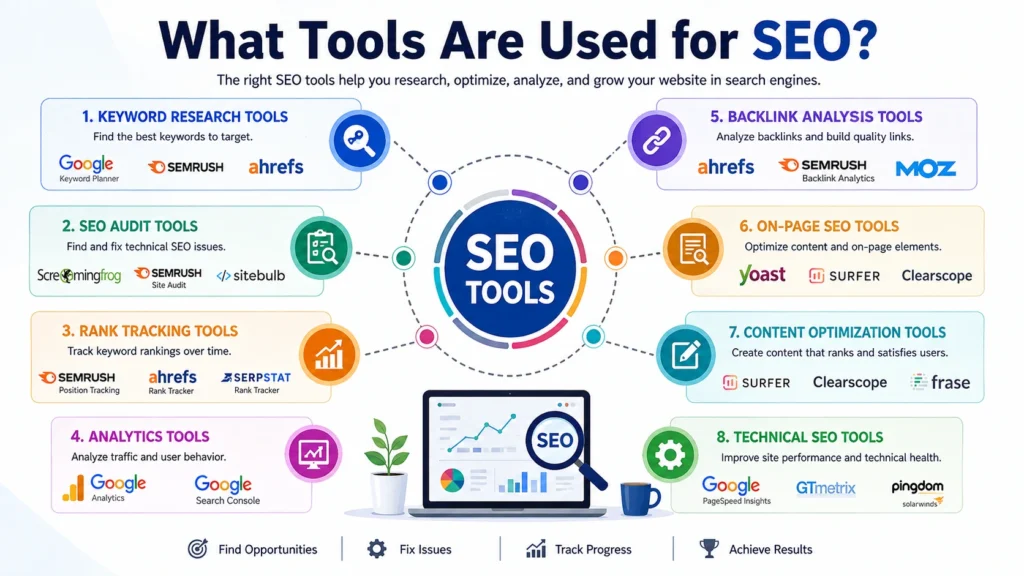
You need a keyword tool, a site audit tool, a rank tracker, and a backlink checker to start. These four cover most of what search engine optimization work needs. Beginners often buy too many tools before they learn what each one actually does for them. So what tools are used for SEO in real day to day work? The answer changes based on your budget, your site size, and your goals. This guide breaks it down step by step. What Are SEO Tools? SEO tools are software programs that help you research, plan, and check your website’s performance in search results. They pull data from Google and other sources, then show it in a way you can use. Some tools focus on one job, like finding keywords. Others try to do everything in one dashboard. You don’t need every tool on the market. You need the right ones for your stage of growth. A new blog has different needs than an online store with ten thousand pages. Good tools save time. They also catch mistakes you might miss on your own, like broken links, duplicate titles, or slow page speed. Since search engines now factor in page experience alongside content quality, catching these technical issues early matters more than it did a few years back. What Tools Are Used for SEO? Here is a breakdown by category, since that’s how most SEO professionals think about their toolkit. Keyword Research Tools SEO keyword research tools show you what people type into search engines. They also show search volume, competition level, and related terms. Popular options include Google Keyword Planner, Ahrefs, SEMrush, and Ubersuggest. Google Keyword Planner is free but built for ads, so the numbers can feel rough for pure content planning. Ahrefs and SEMrush cost money but give sharper, more current data. If you’re just starting out, free tools work fine. As your site grows and competition increases, paid tools give you an edge with more precise numbers and features like keyword difficulty scores. Website Audit Tools SEO website audit tools scan your entire site and flag problems. They check for broken links, missing meta tags, slow pages, duplicate content, and crawl errors. Screaming Frog, Sitebulb, and the audit features inside Ahrefs and SEMrush are common picks. Run an audit at least once a quarter. Sites change constantly. New pages get added, old ones get removed, and small errors pile up if nobody checks. Rank Tracking Tools These tools watch where your pages sit in search results for chosen keywords, day after day. AccuRanker, SEMrush, and Ahrefs all offer this. Watching your rank alone won’t fix anything, but it tells you whether your changes are working. Backlink Analysis Tools Backlinks still carry weight in how search engines judge a site’s trust. Tools like Ahrefs, Majestic, and SEMrush show who links to you and who links to your competitors. This helps you find new link opportunities and spot harmful links you might want to disavow. On-Page SEO Tools These check individual pages for keyword placement, header structure, image alt text, and readability. Yoast SEO and Rank Math are the two biggest names for WordPress sites. Surfer SEO and Clearscope go a step further by comparing your draft against top-ranking pages for the same topic. Content Optimization Tools Content optimization tools help you write pages that cover a topic in full, not just the surface. Surfer SEO, Frase, and MarketMuse analyze top-ranking pages and suggest related terms, questions, and subtopics you should include. This matters more now that search engines reward pages that answer a query completely, rather than pages stuffed with one keyword repeated over and over. Local SEO Tools If you run a local business, tools like Google Business Profile, BrightLocal, and Whitespark help you manage listings, reviews, and local rankings. These are separate from general SEO tools since local search works on different signals, like proximity and reviews. Best SEO Tools for Different Budgets Since budget shapes what you can afford, here’s a rough guide. Free or low cost: Google Search Console, Google Analytics, Google Keyword Planner, Ubersuggest (limited free tier), Yoast SEO (basic version). Mid range: SEMrush, Ahrefs, Moz Pro, Surfer SEO. These typically run between forty and two hundred dollars a month depending on the plan. Enterprise level: BrightEdge, Conductor, and enterprise Ahrefs or SEMrush plans built for large teams and huge websites. Among these, SEMrush and Ahrefs come up again and again as best SEO tools because they cover keyword research, audits, rank tracking, and backlinks in one place. SEO Tools for Beginners If you’re new, don’t try to learn ten tools at once. Start with these three: Google Search Console – free, shows how Google sees your site and which queries bring in clicks. Google Analytics – free, shows how visitors behave once they land on your pages. One keyword tool – pick either Ubersuggest or the free version of Ahrefs Webmaster Tools to start finding topics worth writing about. Once you’re comfortable with these three, add a content optimization tool and a basic audit tool. Growing your toolkit slowly helps you actually understand the data instead of getting buried in numbers you don’t know how to read. How to Choose the Right SEO Tool Match the tool to your actual problem, not the other way around. If you don’t know what to write about, get a keyword tool first. If your site has technical issues, an audit tool comes first. If you’re losing rank and don’t know why, a rank tracker paired with an audit tool will show you faster than guessing. Also think about your skill level. Some tools, like Screaming Frog, require you to understand crawl data and technical SEO terms. Others, like Rank Math, walk you through fixes with plain language and checklists. If reading dashboards and reports still feels confusing, structured training can close that gap faster than trial and error. LocalPro1 Institute offers SEO courses in Rawalpindi that walk you through these tools hands on, so you learn

What Tools Are Used for SEO? Read More »

Graphic designer salary in Pakistan showing earning potential, freelance opportunities, and career growth.

How Much Can a Graphic Designer Earn in Pakistan?

A graphic designer in Pakistan can earn between PKR 25,000 and PKR 200,000 a month, depending on skill level, city, and whether they work full time or freelance. Entry-level roles sit at the low end. Senior designers and freelancers with international clients sit at the top. So, how much can a graphic designer earn in Pakistan in 2026? The honest answer is that your paycheck depends far more on your skills and portfolio than on your degree. Average Graphic Designer Salary in Pakistan Based on current data from Glassdoor, Indeed, and job listings on Rozee.pk, the average graphic designer salary in Pakistan sits between PKR 40,000 and PKR 80,000 per month for a standard corporate or agency job. The median lands close to PKR 50,000 to 54,000 a month across most sources. This range covers full-time employees at design agencies, marketing firms, and in-house creative teams. It does not include freelance income, which can run much higher once a designer builds a strong client base. If you search for graphic designer salary in Pakistan on any job board, you will see this same PKR 40,000 to 80,000 range repeated across listings from Karachi, Lahore, and Islamabad. Fresh graduates should treat this figure as a starting benchmark, not a ceiling. Your graphic designer salary per month grows fast once you add specialized skills that clients and employers actually pay for. To really answer how much can a graphic designer earn in Pakistan, you need to look past the average and check experience, specialization, and location together. Graphic Designer Salary in Pakistan by Experience Level Experience is the single biggest driver of pay. Here is a realistic breakdown based on current market data: Freshers and interns (0-1 year): PKR 15,000 to 25,000 per month. You are still learning software basics and building your first portfolio pieces. Entry-level designers (1-2 years): PKR 25,000 to 40,000 per month. You can handle small independent projects with light supervision. Mid-level designers (2-5 years): PKR 50,000 to 100,000 per month. You manage full projects and often mentor junior staff. Senior designers (5+ years): PKR 100,000 to 180,000 or more per month. You lead creative direction and often work directly with major clients. At top software houses or agencies with international accounts, senior designers with strong specializations like UI/UX or motion graphics report monthly pay above PKR 250,000. The jump from entry level to senior level rarely comes from time alone. It comes from adding skills that employers are actively willing to pay extra for. How Much Can a Freelance Graphic Designer Earn in Pakistan? Freelancing has changed the earning ceiling for designers across the country. A salaried job pays in rupees. Freelance clients on Upwork, Fiverr, and Behance often pay in dollars, which stretches much further once converted. Designers working with local clients on the side, alongside a regular job, typically earn PKR 30,000 to 60,000 a month in extra freelance income. Designers who land international clients on Upwork or Fiverr commonly report $500 to $3,000 a month, which converts to roughly PKR 140,000 to 840,000 depending on the exchange rate. On Upwork specifically, graphic designers charge anywhere from $15 to $150 per hour, based on experience and niche. On Fiverr, new sellers often start close to the national average, but established sellers with Level 2 or Top Rated status regularly report PKR 150,000 to 400,000 a month. Designers with a strong Behance portfolio and steady five-star reviews can charge premium project rates once they build a reliable client base. This is why many Pakistani designers now treat freelancing as a full career rather than a side income. If you are asking how much can a graphic designer earn in Pakistan through freelancing alone, the numbers above show it can outpace a full-time salary within a year or two of consistent work. Which Graphic Design Skills Pay the Most in Pakistan? Not all design skills pay the same. Some specializations command double or triple the standard graphic designer salary in Pakistan because fewer people offer them well. UI/UX Design: PKR 80,000 to 250,000+ per month. High demand from tech companies and startups. Motion Graphics and Animation: PKR 70,000 to 180,000 per month. Needed for social media content, ads, and video production. 3D Modeling and Visualization: PKR 65,000 to 150,000 per month. Used in product design, architecture, and gaming. Brand Identity and Packaging Design: Strong earners for designers who work directly with product companies. Software skill alone will not get you there. Clients pay for designers who understand branding, user experience, and how design supports a business goal. If you want to move into these higher-paying specializations, structured training helps you get there faster than trial and error. LocalPro1 Institute offers practical Graphics Designing Courses in Rawalpindi built around the tools and skills that agencies and international clients actually ask for, from Adobe Creative Suite to Figma-based UI design. Graphic Designer Salary by City in Pakistan Location changes your paycheck more than most designers expect. Karachi: Salaries trend highest here, especially at marketing agencies and multinational firms with regional offices. Lahore: Close behind Karachi, with a large concentration of design agencies and software houses. Islamabad and Rawalpindi: A growing hub for design talent, with rising demand from tech startups and remote-first companies. Smaller cities: Salaries tend to run lower, though freelancing narrows this gap since international clients pay the same rate no matter where you live. If you work remotely for freelance or international clients, your city matters far less. Your skill level and portfolio decide your graphic designer salary per month more than your postal code does. What Factors Affect a Graphic Designer’s Salary? Several factors shape where you land within these ranges: Experience level — More years usually means more responsibility and higher pay. Specialization — UI/UX and motion graphics pay more than general print design. Portfolio quality — A strong, focused portfolio often matters more than a degree. Employer type — Agencies, in-house teams, and freelance clients all pay differently. City and client base

How Much Can a Graphic Designer Earn in Pakistan? Read More »

How to use ChatGPT for SEO with keyword research, content creation, on-page optimization, and SEO analysis.

How To Use ChatGPT For SEO: A Complete 2026 Guide

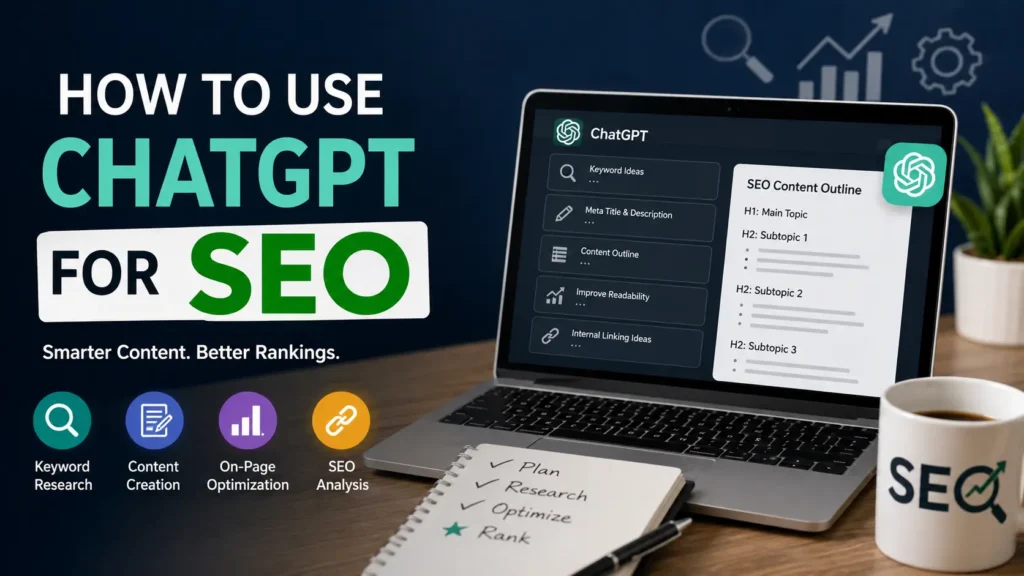
Want a fast answer? Use ChatGPT for keyword clusters, outlines, meta tags, schema markup, and audit checklists, then verify every fact with real SEO tools before you publish. That’s the short version. The long version matters more, because most people use it wrong and end up with thin pages that never rank. This guide breaks down exactly how to use ChatGPT for SEO in 2026, step by step, with real prompts and a workflow you can copy today. What Is ChatGPT in SEO? ChatGPT is an AI writing and research assistant. In SEO, people use it to speed up keyword research, draft outlines, write first drafts, and check technical issues. It doesn’t rank pages on its own. It helps you think faster and write better, but the final content still needs your judgment, your data, and your edits. Google’s December 2025 core update pushed this point hard. Sites with generic AI paragraphs and no real experience behind them lost visibility. Pages built by people who actually know their topic, and who used ChatGPT as a tool instead of a replacement for expertise, held steady or grew. That’s the line you need to stay on. If you want to learn this properly instead of guessing, structured training helps. LocalPro1 Institute runs practical SEO courses in Rawalpindi that cover AI tools, keyword strategy, and on-page optimization taught by people who rank real client sites, not just theory from a slide deck. Can ChatGPT Improve SEO Rankings? Yes, indirectly. ChatGPT won’t push a page to position one by itself. What it does is cut the time you spend on research, drafting, and formatting, so you can publish more well structured content, faster. It also helps you spot content gaps, write cleaner meta tags, and organize topics into clusters that search engines understand. The catch is quality control. ChatGPT sometimes invents statistics or misstates facts. Every claim needs a check against a real source before it goes live. Skip that step and you risk publishing wrong information, which hurts trust and rankings both. How to Use ChatGPT for Keyword Research ChatGPT is good at brainstorming, not at giving you real search volume. Use it to expand a seed keyword into related terms, then confirm numbers in a tool like Google Keyword Planner or Ahrefs. Try this approach: Give ChatGPT your main topic and ask for 30 related long tail keywords grouped by search intent. Ask it to sort keywords into informational, commercial, and transactional buckets. Ask for question based keywords people type into Google and AI chat tools. Cross check volume and difficulty in a dedicated keyword tool before finalizing your list. This combination of ChatGPT for keyword research and a real data tool gives you both speed and accuracy. How to Use ChatGPT for Content Planning Once you have your keywords, ask ChatGPT to build a content calendar around topic clusters instead of single isolated posts. Group related keywords under one pillar page, then plan supporting articles that link back to it. Ask ChatGPT to map out: A pillar topic and 8 to 10 supporting subtopics Search intent for each subtopic Suggested internal linking between pages Content gaps your competitors haven’t covered yet This builds the topic depth Google rewards, because it shows your site covers a subject fully instead of publishing one thin page and moving on. How to Use ChatGPT for Writing SEO Content This is where most people go wrong. They ask ChatGPT to write a full article and publish it as is. That content reads generic, and Google’s helpful content systems are built to catch exactly that pattern. Instead, use ChatGPT as a drafting partner: Feed it your outline, target keyword, and any research notes or data you already have. Ask for a first draft based only on what you gave it, not general knowledge. Rewrite sections in your own voice and add specific examples from your own experience. Insert real numbers, case studies, or client results ChatGPT could never know on its own. This is how AI SEO content writing stays useful without becoming spammy. The AI handles structure and speed. You add the proof and the personality. How to Use ChatGPT for On-Page SEO ChatGPT handles on-page tasks well because they follow clear patterns. Ask it to: Write 3 to 5 title tag options under 60 characters Draft a meta description under 150 characters with the target keyword Suggest header structure (H1, H2, H3) based on your outline Write alt text for images that describes the image and includes context, not just keywords Check keyword placement in your first 100 words Always review the output. ChatGPT sometimes writes titles that are too long or descriptions that don’t match your actual page content. How to Use ChatGPT for Technical SEO ChatGPT can explain technical concepts and even write code snippets, but it can’t crawl your site. Use it to: Generate schema markup templates (FAQ, article, product, local business) Explain what a specific error in Google Search Console means and how to fix it Draft a robots.txt file based on your site structure Write canonical tag logic for duplicate pages Paste your actual site data or error messages into the chat for accurate answers. Generic questions get generic answers. How to Use ChatGPT for Local SEO Local businesses can use ChatGPT to draft Google Business Profile descriptions, local landing page copy, and location specific FAQs. Ask it to write content around neighborhood names, local landmarks, and city specific search terms your customers actually use. It also helps write review response templates and local schema markup, both of which support local pack rankings when combined with consistent business information across the web. How to Use ChatGPT for Ecommerce SEO Product pages need unique descriptions, not copied manufacturer text. ChatGPT can draft product descriptions fast when you feed it real specs, use cases, and customer pain points. Ask it to write comparison content between similar products, size guides, and category page intros that target broader commercial keywords. Always add real

How To Use ChatGPT For SEO: A Complete 2026 Guide Read More »

Illustration showing local SEO without a website using Google Business Profile, customer reviews, Google Maps, local citations, and local search visibility.

Can You Do Local SEO Without a Website?

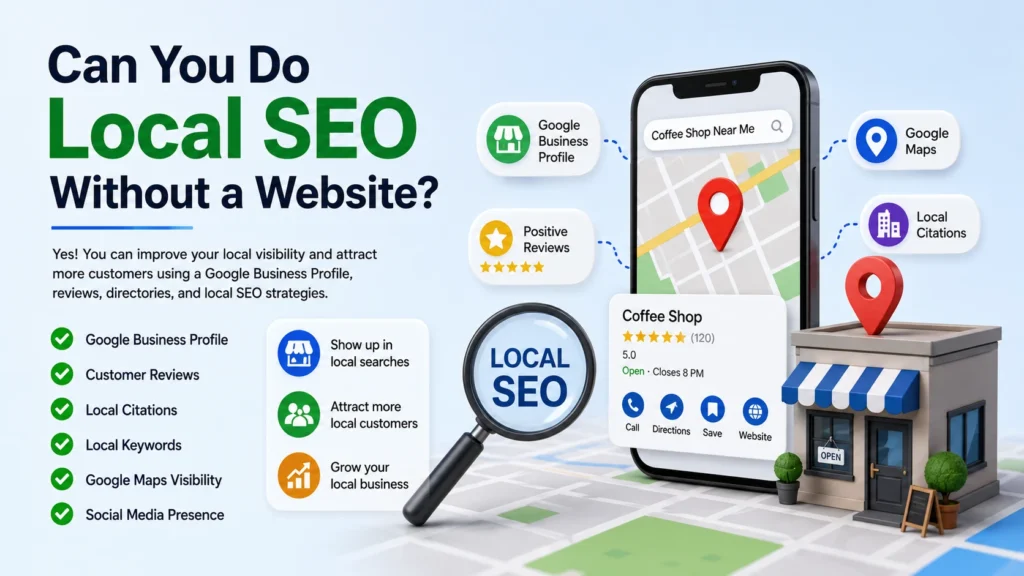
Yes, you can. A Google Business Profile, reviews, citations, and social pages let you show up in local search without a single web page. This is not a workaround. It is a real strategy that plumbers, salons, and clinics use every day to get calls and walk-ins. You do not need code skills or a big budget to start. Can you do local SEO without a website? Absolutely, and this guide shows you exactly how, plus when a website still helps. How Local SEO Works Without a Website Local SEO without a website relies on Google’s own tools instead of your own domain. Google wants to answer “near me” searches fast. It pulls that answer from business listings, maps, and reviews, not just websites. Your Google Business Profile becomes your homepage in this setup. It holds your hours, phone number, photos, and posts. Combine that with citations on directories like Yelp and Bing Places, and you build a signal Google can trust. Why a Google Business Profile Is Essential Your Google Business Profile, or GBP, is the backbone of local SEO without a website. It shows up in the Local Pack, Google Maps, and normal search results. Without it, you are nearly invisible to nearby customers. Fill out every section. Add your category, service area, business description, and attributes like “wheelchair accessible” or “free Wi-Fi.” Google rewards profiles that are complete over ones left half done. Post updates weekly. Photos of your team, your storefront, or finished jobs give Google fresh content to crawl. This also answers a common question business owners ask: can Google Business Profile replace a website? For local search visibility, it often does the heavy lifting. What You Can Optimize Without a Website You still have plenty to work with, even without a domain: Business name, address, and phone number (NAP) consistency across every listing Service descriptions written in plain language your customers actually search Photos and videos that show real work, not stock images Q&A sections on your profile, answered by you before customers guess wrong Booking links or messaging buttons so people can contact you directly Each of these pieces feeds Google’s ranking system. None of them require a website. How Customer Reviews Improve Local Rankings Reviews are one of the strongest ranking signals in local search. Google looks at review count, review quality, and how recently reviews came in. A steady stream of new reviews tells Google your business is active and trusted. Ask happy customers directly. Send a text or email with a direct link to your review page. Respond to every review, good or bad, since responses show you are paying attention. Reviews also build real trust with people scanning search results. A five star rating with recent comments about fast service beats a fancy website with no social proof. Build Local Citations Without a Website Citations are online mentions of your business name, address, and phone number. Directories like Yelp, Apple Maps, Bing Places, and industry specific sites all count. Consistent citations confirm to Google that your business is real and located where you say it is. Start with the big directories, then move to niche ones for your industry. A roofing company should be listed on roofing directories. A dentist should be listed on dental and health directories. This depth signals relevance beyond just being local. Use Social Media to Support Local SEO Social profiles fill the gap a website usually covers. Facebook, Instagram, and LinkedIn pages can hold your services, location, hours, and customer messages. Google does index public social content, and active pages support your overall local presence. Post consistently and tag your location. Encourage customers to check in or tag you in photos. This activity adds another layer of proof that your business serves real people in a real place. Optimize for Local Keywords Without a Website Keyword strategy does not disappear just because you skip a website. You still need to think about how people search. Someone typing “emergency plumber near me” or “best haircut in [city]” is showing clear intent. Use these keywords in your Google Business Profile description, service list, and posts. This is where local SEO without a website gets technical but manageable. You are matching real search phrases to the fields Google already gives you. Include your city and neighborhood names naturally. Do not stuff keywords into every sentence. Write like you are explaining your business to a new customer standing in front of you. Get Listed on Google Maps Google Maps and your Business Profile are tightly connected. Once your profile is verified, your pin appears on the map for relevant searches. Accurate location pinning matters more than people expect. Double check your address is dropped on the correct building, not just the correct street. A misplaced pin sends customers to the wrong spot and hurts your local ranking. Set your service area correctly if you travel to customers instead of running a storefront. Categories matter here too. Choose the most accurate primary category, then add secondary categories that describe extra services. This helps Google match you to more search queries. Benefits of Having a Website Alongside Local SEO A website is not required to start, but it adds real advantages once your business grows. It gives you a home for detailed service pages, blog content, and case studies that a Business Profile cannot hold. Websites also let you collect leads through forms, build email lists, and control your own branding fully. Google Business Profile is powerful, but you are still working within Google’s rules and layout. A website is yours. Search engines also use websites to confirm expertise and depth. Long guides, FAQs, and detailed “about us” pages support E-E-A-T signals, which stands for experience, expertise, authority, and trust. This is harder to show with a profile page alone. When a Website Becomes Necessary There comes a point where skipping a website starts to cost you. If you sell products online, run multiple locations, or want to rank

Can You Do Local SEO Without a Website? Read More »

llustration comparing technical SEO and local SEO with website optimization, search engine crawling, maps, and local business visibility.

What Is Technical SEO and Local SEO?

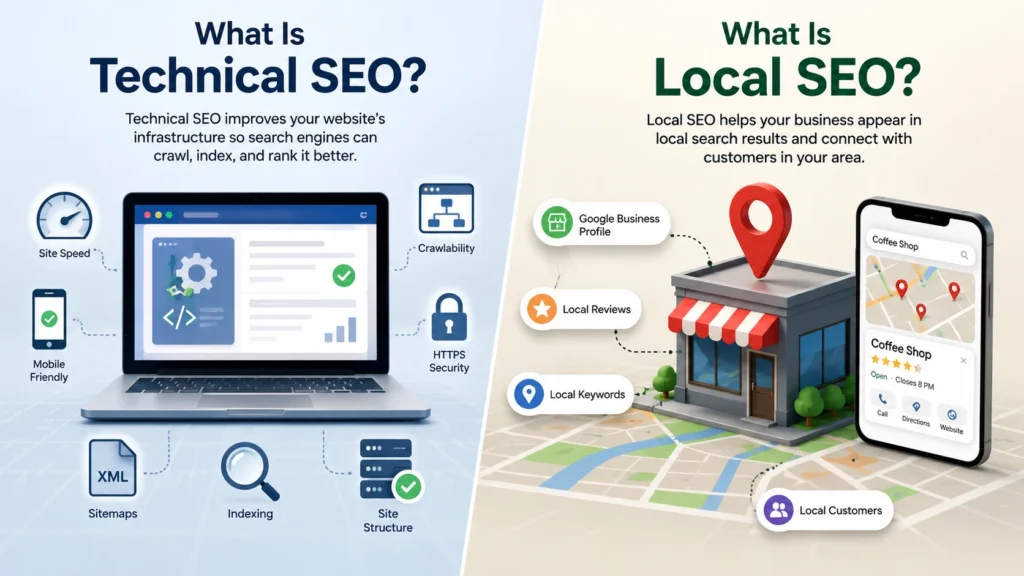
Technical SEO fixes how well Google can crawl, read, and load your site. Local SEO helps your business show up when people search near their city or neighborhood. Both work together to bring you real traffic. If you want a full answer to What Is Technical SEO and Local SEO?, this guide breaks down both terms in plain words. You will learn the key parts, common mistakes, and the tools that actually help. LocalPro1 Institute has created this guide to help beginners, business owners, and marketers understand both types of SEO and use them to improve their online visibility. What Is SEO? SEO stands for Search Engine Optimization. It is the process of making a website easier to find on Google, Bing, and other search engines. SEO has many branches. Technical SEO handles the backend of your site. Local SEO handles your presence in nearby searches like “plumber near me” or “best bakery in Rawalpindi.” Content SEO, on-page SEO, and off-page SEO round out the full picture, but this guide focuses on the two that most business owners ask about first. Google’s search systems now reward sites that answer questions fast, load quickly, and prove real experience. This shift became sharper after Google’s December 2025 core update, which put more weight on page speed, site trust, and content built by people with genuine expertise. Thin pages and rushed AI content lost ground. Sites with clear structure and honest, useful answers gained visibility. That update is a big reason technical soundness and local trust signals matter more today than they did a year ago. Technical SEO Section Technical SEO is the foundation your content sits on. Without it, even great writing struggles to rank. Key Elements of Technical SEO Site speed. Google tracks how fast your pages load using Core Web Vitals. Pages that load in under 2.5 seconds tend to perform better. Slow pages lose visitors and rankings. Mobile friendliness. Most searches happen on phones. Google uses mobile-first indexing, which means it looks at your mobile site first when deciding your rank. Crawlability. Search engines use bots to scan your site. A clean XML sitemap and a correct robots.txt file help these bots find every important page. Site structure. A logical folder structure and clear internal links help both users and search bots move through your site with ease. Secure connection (HTTPS). Google flags sites without SSL certificates as unsafe. This can hurt trust and rankings. Structured data (schema markup). This code tells search engines exactly what your content means. It also helps your pages appear in rich results, like star ratings or FAQ boxes, and it helps AI tools like Google’s AI Overviews pull accurate answers from your page. Duplicate content control. Canonical tags tell Google which version of a page to index when similar content exists in more than one place. Common Technical SEO Mistakes to Avoid Ignoring broken links and 404 errors Using slow, bloated themes or plugins Skipping a sitemap submission to Google Search Console Blocking important pages in robots.txt by accident Running duplicate title tags across many pages Forgetting alt text on images Best Technical SEO Tools Google Search Console shows crawl errors and indexing issues for free. PageSpeed Insights measures your Core Web Vitals score. Screaming Frog crawls your whole site and flags technical problems. Ahrefs and Semrush both offer full site audits with clear fix lists. Local SEO Section Local SEO explained in simple terms: it helps your business appear when someone nearby searches for what you offer. This matters most for shops, clinics, restaurants, and service businesses with a physical location or a set service area. How Local SEO Works Google looks at three main things for local results: relevance, distance, and prominence. Relevance means how well your listing matches the search. Distance means how close you are to the searcher. Prominence means how well known and trusted your business is, based on reviews, links, and citations. When someone searches “dentist near me,” Google checks its Local Pack, which is the map and three-business list that shows up at the top of results. Ranking there brings direct calls and foot traffic. Key Ranking Factors for Local SEO A complete and verified Google Business Profile Consistent Name, Address, and Phone number (NAP) across the web Positive customer reviews with regular replies from the owner Local citations on directories like Yelp and local chambers of commerce Location-based keywords in your titles and page content Backlinks from other local or regional websites Best Practices for Local SEO Claim and fully fill out your Google Business Profile. Add real photos, correct hours, and your exact service area. Ask happy customers for reviews and respond to every one, good or bad. Create a separate page for each city or area you serve, with unique content for each. Add your city name naturally in headers and body text. Build local backlinks through sponsorships, local news, or community events. Common Local SEO Mistakes Leaving business hours or address outdated Using the exact same content on every location page Ignoring or deleting negative reviews instead of replying Missing NAP consistency across directories Skipping local keywords in page titles Technical SEO vs Local SEO (Comparison Table) Factor Technical SEO Local SEO Main goal Improve site health and crawlability Improve visibility in local searches Focus area Site speed, structure, indexing Google Business Profile, reviews, citations Best for All websites Businesses with a physical or service area Key tools Search Console, Screaming Frog Google Business Profile, BrightLocal Ranking signal Page experience and technical health Relevance, distance, prominence This table sums up the difference between technical SEO and local SEO in one glance. Both are needed, but they solve different problems. How Technical SEO and Local SEO Work Together A fast, well-built website gives local pages a better chance to rank. If your site loads slowly or has broken pages, Google may hesitate to show it in local results, even with great reviews. On the other hand, strong technical SEO without any local

What Is Technical SEO and Local SEO? Read More »