

You need a keyword tool, a site audit tool, a rank tracker, and a backlink checker to start. These four cover most of what search engine optimization work needs. Beginners often buy too many tools before they learn what each one actually does for them.
So what tools are used for SEO in real day to day work? The answer changes based on your budget, your site size, and your goals. This guide breaks it down step by step.
What Are SEO Tools?
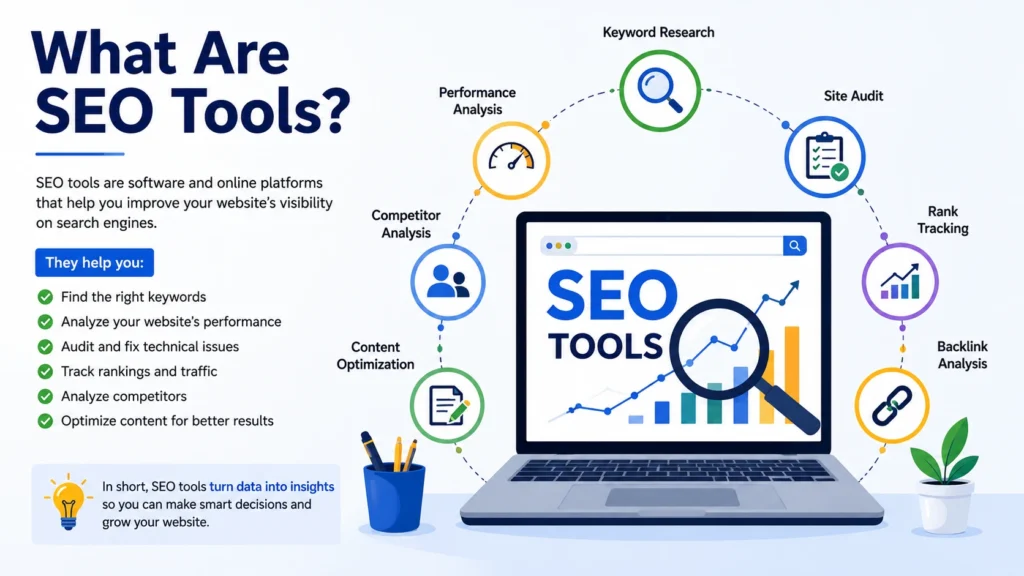
SEO tools are software programs that help you research, plan, and check your website’s performance in search results. They pull data from Google and other sources, then show it in a way you can use. Some tools focus on one job, like finding keywords. Others try to do everything in one dashboard.
You don’t need every tool on the market. You need the right ones for your stage of growth. A new blog has different needs than an online store with ten thousand pages.
Good tools save time. They also catch mistakes you might miss on your own, like broken links, duplicate titles, or slow page speed. Since search engines now factor in page experience alongside content quality, catching these technical issues early matters more than it did a few years back.
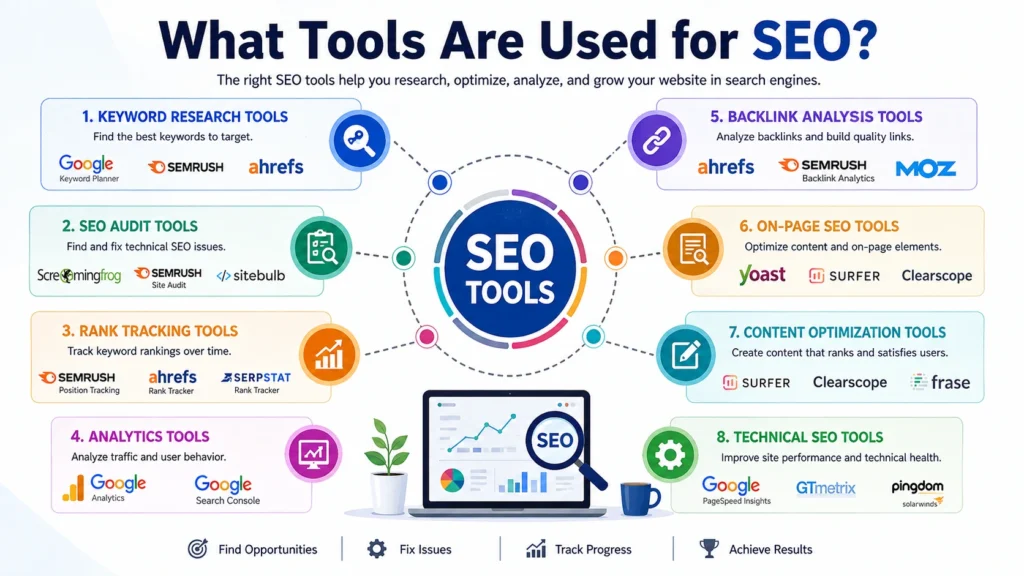
What Tools Are Used for SEO?
Here is a breakdown by category, since that’s how most SEO professionals think about their toolkit.
Keyword Research Tools
SEO keyword research tools show you what people type into search engines. They also show search volume, competition level, and related terms. Popular options include Google Keyword Planner, Ahrefs, SEMrush, and Ubersuggest. Google Keyword Planner is free but built for ads, so the numbers can feel rough for pure content planning. Ahrefs and SEMrush cost money but give sharper, more current data.
If you’re just starting out, free tools work fine. As your site grows and competition increases, paid tools give you an edge with more precise numbers and features like keyword difficulty scores.
Website Audit Tools
SEO website audit tools scan your entire site and flag problems. They check for broken links, missing meta tags, slow pages, duplicate content, and crawl errors. Screaming Frog, Sitebulb, and the audit features inside Ahrefs and SEMrush are common picks.
Run an audit at least once a quarter. Sites change constantly. New pages get added, old ones get removed, and small errors pile up if nobody checks.
Rank Tracking Tools
These tools watch where your pages sit in search results for chosen keywords, day after day. AccuRanker, SEMrush, and Ahrefs all offer this. Watching your rank alone won’t fix anything, but it tells you whether your changes are working.
Backlink Analysis Tools
Backlinks still carry weight in how search engines judge a site’s trust. Tools like Ahrefs, Majestic, and SEMrush show who links to you and who links to your competitors. This helps you find new link opportunities and spot harmful links you might want to disavow.
On-Page SEO Tools
These check individual pages for keyword placement, header structure, image alt text, and readability. Yoast SEO and Rank Math are the two biggest names for WordPress sites. Surfer SEO and Clearscope go a step further by comparing your draft against top-ranking pages for the same topic.
Content Optimization Tools
Content optimization tools help you write pages that cover a topic in full, not just the surface. Surfer SEO, Frase, and MarketMuse analyze top-ranking pages and suggest related terms, questions, and subtopics you should include. This matters more now that search engines reward pages that answer a query completely, rather than pages stuffed with one keyword repeated over and over.
Local SEO Tools
If you run a local business, tools like Google Business Profile, BrightLocal, and Whitespark help you manage listings, reviews, and local rankings. These are separate from general SEO tools since local search works on different signals, like proximity and reviews.
Best SEO Tools for Different Budgets
Since budget shapes what you can afford, here’s a rough guide.
Free or low cost: Google Search Console, Google Analytics, Google Keyword Planner, Ubersuggest (limited free tier), Yoast SEO (basic version).
Mid range: SEMrush, Ahrefs, Moz Pro, Surfer SEO. These typically run between forty and two hundred dollars a month depending on the plan.
Enterprise level: BrightEdge, Conductor, and enterprise Ahrefs or SEMrush plans built for large teams and huge websites.
Among these, SEMrush and Ahrefs come up again and again as best SEO tools because they cover keyword research, audits, rank tracking, and backlinks in one place.
SEO Tools for Beginners
If you’re new, don’t try to learn ten tools at once. Start with these three:
- Google Search Console – free, shows how Google sees your site and which queries bring in clicks.
- Google Analytics – free, shows how visitors behave once they land on your pages.
- One keyword tool – pick either Ubersuggest or the free version of Ahrefs Webmaster Tools to start finding topics worth writing about.
Once you’re comfortable with these three, add a content optimization tool and a basic audit tool. Growing your toolkit slowly helps you actually understand the data instead of getting buried in numbers you don’t know how to read.
How to Choose the Right SEO Tool
Match the tool to your actual problem, not the other way around. If you don’t know what to write about, get a keyword tool first. If your site has technical issues, an audit tool comes first. If you’re losing rank and don’t know why, a rank tracker paired with an audit tool will show you faster than guessing.
Also think about your skill level. Some tools, like Screaming Frog, require you to understand crawl data and technical SEO terms. Others, like Rank Math, walk you through fixes with plain language and checklists.
If reading dashboards and reports still feels confusing, structured training can close that gap faster than trial and error. LocalPro1 Institute offers SEO courses in Rawalpindi that walk you through these tools hands on, so you learn how to read the data and act on it, not just stare at numbers.
How to Use SEO Tools Effectively
Owning a tool doesn’t help if you don’t use it correctly. Here’s how to get real value from what you have.
- Set a schedule. Check rank tracking weekly, run full audits monthly or quarterly.
- Act on findings. A tool that flags ten broken links only helps if you fix them.
- Cross check data. Different tools show slightly different numbers for search volume and rankings. Use two sources before making a big decision.
- Focus on trends, not single data points. One bad day in rankings doesn’t mean much. A three week decline does.
- Combine tool data with real reader feedback. Comments, time on page, and bounce rate tell you things a keyword tool can’t.
Common Mistakes When Using SEO Tools
Even good tools get misused. Watch for these:
Chasing every metric. Not every number in a dashboard needs your attention. Focus on the few that connect to your actual goals, like organic traffic and conversions.
Ignoring intent. A keyword tool can show high search volume for a term that doesn’t match what your business actually offers. Check what’s already ranking for a keyword before you write for it.
Stuffing keywords based on tool suggestions. Content tools suggest related terms to include, but cramming them all in unnaturally hurts readability and can hurt rankings too.
Skipping technical fixes. Many site owners run an audit, see the results, and never fix anything. The audit itself changes nothing without action.
Relying on one tool for everything. No single tool gives a full picture. Combine at least a keyword tool, an audit tool, and analytics for a complete view of your site’s health.
This kind of care matters more since Google’s December 2025 core update reshaped a lot of rankings across industries. That update pushed harder on content depth, real expertise, and page experience together, rather than rewarding any single ranking factor on its own. Sites that leaned on thin, surface level content or ignored page speed saw drops, while sites with well researched, complete pages held steady or gained ground. This is a strong reminder that tools should guide your judgment, not replace it.
Can You Do SEO Without SEO Tools?
Technically, yes. You can write helpful content, structure your site well, and get some results without any paid or free software. Search engines were designed to reward genuinely useful pages, tools or not.
But doing SEO without tools is slow and full of blind spots. You won’t know why a page dropped in rank. You won’t catch a broken link buried five pages deep. You won’t know which keywords actually bring in traffic versus which ones just sound good.
Tools don’t replace good writing or a real understanding of your audience. They speed up the parts of the job that are hard to do by hand, like scanning thousands of pages for errors or comparing your content against dozens of competitors at once.
Conclusion
So, what tools are used for SEO? It depends on the job in front of you. Keyword research tools help you find what to write about. Audit tools catch technical problems. Rank trackers show if your work is paying off. Backlink tools help you build authority over time.
Start small if you’re new. Add tools as your site grows and your questions get more specific. The goal isn’t to own every tool available. It’s to understand your site well enough to know exactly which tool solves the problem you actually have. Need help choosing the right SEO tools or improving your website’s SEO? Contact us today to get practical guidance from LocalPro1 Institute.
FAQs
What is the most important SEO tool for beginners?
Google Search Console. It’s free, it’s built by Google, and it shows real data about how your site performs in search.
Are paid SEO tools worth the cost?
For small sites just starting out, free tools often cover the basics. As your site grows and competition increases, paid tools like Ahrefs or SEMrush give you sharper data that can save time and guesswork.
How many SEO tools do I actually need?
Most site owners do well with four to five: a keyword tool, an audit tool, a rank tracker, analytics, and one content optimization tool.
Do SEO tools guarantee higher rankings?
No. Tools give you data and point out problems. You still need to act on that information and create genuinely useful content for your rank to improve.
How often should I run an SEO audit?
Once a quarter works well for most sites. Larger sites with frequent changes may benefit from monthly checks.