

SEO Practically

digital marketing services

Explore professional digital marketing services, including SEO, PPC, social media, content marketing, and web strategies to grow your business online.

5 ways to keep your clients coming back as a freelancer, including quality work, communication, deadlines, and relationships

5 Ways to Keep Your Clients Coming Back as a Freelancer

Want clients who hire you again and again, not just once? Here are the 5 ways to keep your clients coming back as a freelancer that actually work. These methods come from real freelance experience, not guesswork. Repeat clients pay faster, trust you more, and skip the awkward pitch stage. This guide on 5 ways to keep your clients coming back as a freelancer will show you exactly how to earn that loyalty. Why Repeat Clients Are Essential for Freelancers Finding a new client takes time. You write proposals, join calls, and explain your process from scratch. A repeat client skips all of that. Freelance client retention tips matter because return clients often pay more over time. They already trust your work, so they say yes faster. They also refer you to other people, which brings in new work without extra effort. If you want to know how to get repeat clients as a freelancer, start by understanding this: retention is cheaper and faster than constant new client hunting. It also gives your income more stability month to month. Below, we break down each of the 5 ways to keep your clients coming back as a freelancer with real, practical steps you can start using today. Way #1: Deliver High-Quality Work Every Time Quality is the base of every long freelance relationship. Clients remember the freelancer who gets it right the first time. Don’t cut corners even on small projects. A rushed job today can cost you a client tomorrow. Read the brief twice before you start. Ask questions if something feels unclear. Check your work before you send it. Typos, missed instructions, or sloppy formatting make clients doubt your skills. A polished file builds instant trust. This is one of the simplest ways to retain freelance clients. When your work speaks for itself, clients stop shopping around. They come back because they know what to expect from you. Way #2: Communicate Clearly and Professionally Bad communication kills more freelance relationships than bad work does. Clients want updates. They want honesty. They want quick replies. Set expectations early. Tell clients how you like to communicate and how fast you usually reply. This avoids confusion later. If something goes wrong, say it early. Clients respect honesty more than silence. A short message about a delay beats a missed deadline with no warning. Use simple, clear language in emails and messages. Avoid long paragraphs that bury the main point. Get to your answer fast, then add details if needed. Clear communication is one of the most overlooked freelance client retention tips. It costs nothing but builds real trust over time. Way #3: Always Meet Deadlines Deadlines are not suggestions. Clients plan their own work around your delivery date. Missing it creates a chain reaction of problems on their end. If you sense a delay coming, tell the client right away. Give them a new date and stick to it. Most clients accept a heads up. Few forgive silence. Build buffer time into your own schedule. If a task usually takes three days, plan for four. This protects you from small delays turning into missed deadlines. Freelancers who consistently deliver on time become the first choice for future projects. This single habit answers a lot of questions about how to retain freelance clients without extra marketing. Way #4: Build Long-Term Relationships Treat every client like a long-term partner, not a one-time task. Ask about their goals beyond the current project. Show interest in their business. Send a quick check-in message after a project ends. Ask if the work is performing well. This small step keeps you on their mind for the next task. Remember small details. Their product name, their team members, their past preferences. Clients notice when you remember these things without being reminded. Long-term relationships are the real answer to how to become a successful freelancer. One-time gigs pay the bills, but relationships build a career. Way #5: Continue Improving Your Skills Clients hire freelancers who keep learning. Skills that worked two years ago may not be enough today. Staying sharp keeps you useful to your clients. Take short courses in your field every few months. Read case studies. Study what top freelancers in your niche are doing differently. If you want structured training, Digital Marketing courses in Rawalpindi from Localpro 1 Institute teach practical, job-ready skills for freelancers who want to grow their client base. Learning from a proper institute can shortcut months of trial and error. Better skills mean better results for your clients. And better results are the strongest of all the 5 ways to keep your clients coming back as a freelancer. Growth in this field never really stops. New platforms, new tools, and new client expectations show up every year. Freelancers who treat learning as a habit, not a one time event, stay useful longer. Bonus Tips to Increase Client Retention Offer a small loyalty discount for repeat projects. It costs you little but signals appreciation. Send a thank you message after payment. This simple habit is rare among freelancers and it stands out. Ask for feedback after every project. It shows you care about improving and gives you proof of good work for future pitches. Keep a simple record of each client’s preferences, past projects, and deadlines. This makes every new project with them faster and smoother. Common Mistakes That Drive Clients Away Overpromising and underdelivering tops the list. Clients remember broken promises longer than they remember good work. Ignoring messages for days without explanation frustrates clients fast. Even a short reply saying you are busy helps. Charging without clear reasons confuses clients and breaks trust. Always explain your pricing before you start. Disappearing after a project ends, with no follow up, wastes a chance to turn one job into a long relationship. Taking on too much work at once also hurts your reputation. Quality drops when you rush between too many clients at the same time. It is better to manage fewer projects

5 Ways to Keep Your Clients Coming Back as a Freelancer Read More »

How to select a skill set to become a successful freelancer, showing steps like identifying interests and researching market demand

How To Select a Skill Set to Become a Successful Freelancer?

The fastest way to pick a freelance skill is to match your natural strengths with real market demand. Test a few options with small paid projects before you commit. This keeps you from wasting months on the wrong path. Knowing how to select a skill set to become a successful freelancer is the single decision that shapes your entire income. Get it right, and clients start finding you instead of the other way around. Why Choosing the Right Freelance Skill Is Important A freelance skill set is the group of abilities you sell to clients as a service. It can be one core skill, like copywriting, or a mix of skills that work together, like web design plus basic SEO. Most beginners search for the skills needed for freelancing without realizing that a skill set is really a small business offer. You are not just learning a task. You are packaging a solution someone will pay for again and again. A strong skill set has three parts. It solves a real problem, it can be delivered online, and it has a repeatable process. If your skill checks all three boxes, you have something worth building a career around. Why Choosing the Right Skill Set Matters for Freelancers Picking the wrong skill wastes time and money. You might spend months learning a tool that clients rarely pay for, then start over from scratch. That is a rough way to begin a freelance career. The right skill set gives you three things. It gives you steady demand, because clients are actively searching for that service. It gives you pricing power, because fewer freelancers offer it well. And it gives you long term growth, because the skill stays useful as your experience grows. A poor choice leads to burnout and low rates. A good choice leads to repeat clients and referrals within the first year. How To Select a Skill Set to Become a Successful Freelancer This is the part most guides skip. Selecting the right path takes a mix of self review and market research, not guesswork. Start by listing what you already do well, even outside of work. Maybe you write clear emails, organize spreadsheets, or explain things simply. These small habits often point to a marketable skill. Next, check demand on freelance platforms and job boards. Search the skill name and see how many active listings exist and what they pay. If a skill has steady postings and decent rates, it is worth testing. Then run a small test. Take on one or two paid gigs, even at a lower rate, and see how the work feels. Learning how to select a skill set to become a successful freelancer means treating your first few weeks as research, not a final decision. Finally, narrow your choice to one primary skill and one supporting skill. Two is enough to start. You can always add more once you have income coming in. Best Freelancing Skills to Consider in 2026 Some skills consistently bring in stronger demand than others. Content writing and copywriting remain steady, since every business needs words for websites, ads, and emails. Web development and WordPress work also stay strong, because small businesses always need sites built or fixed. Video editing has grown fast, driven by short form content on social platforms. Graphic design keeps a wide client base too, from logos to social media posts. Digital marketing, including SEO and paid ads, is one of the best picks for Freelancing skills for beginners, since the learning curve is manageable and the pay scales quickly with results. Data entry and virtual assistant work suit people who want quick entry with low technical barriers. Customer support and chat handling also offer stable part time income for newer freelancers. Pick from this list based on your interests, not just the pay rate. Interest keeps you consistent when the work gets repetitive. How To Combine Skills to Build a Strong Freelance Profile A single skill can work, but stacking two related skills makes you harder to replace. A writer who also understands basic SEO can charge more than a writer alone. A designer who can code simple landing pages stands out from designers who only hand off files. Look for skills that naturally support each other. Video editing pairs well with basic scriptwriting. Web design pairs well with WordPress setup. Pick combinations where the second skill saves the client from hiring a separate freelancer. That convenience alone can justify higher rates. How to Know If a Freelance Skill Is Right for You Not every in demand skill fits every person. A good fit usually shows up in three signs. You finish practice projects without losing interest halfway through. You get compliments on the work from people outside your close circle. And you find yourself improving without forcing it, just from doing the work regularly. If a skill drains your energy every time you sit down to practice, that is a warning sign, even if it pays well. Sustainable freelancing depends on picking something you can do for years, not just months. This is why how to select a skill set to become a successful freelancer always includes an honest check on your own patience and interest, not just market data. Common Mistakes to Avoid When Choosing Freelance Skills Many beginners chase trending skills without checking if they enjoy the work. Trends fade, and forced interest fades faster. Others try to learn five skills at once, which spreads their effort too thin to master any of them properly. Skipping practice projects is another common error. Reading tutorials without applying them leaves gaps that show up the moment a real client asks for revisions. Ignoring pricing research also hurts beginners, since undercharging early can trap you in low paying work for far too long. Lastly, some freelancers pick a skill purely based on what a friend is doing. Your friend’s strengths and interests are not yours. Base your choice on your own testing, not someone

How To Select a Skill Set to Become a Successful Freelancer? Read More »

Is learning SEO worth it in 2026 illustration showing a man researching career opportunities, high demand skills, and AI SEO growth

Is Learning SEO Worth It in 2026? A Complete Guide

Yes, SEO is still worth learning in 2026. Google’s December 2025 core update proved that sites with real depth and genuine experience win, while thin content keeps losing ground. This shift makes SEO skills more valuable, not less. So is learning SEO worth it in 2026? The short answer is yes, but only if you learn it the right way. This guide breaks down exactly why. What Is SEO? SEO stands for search engine optimization. It is the process of making a website easier for search engines to find, understand, and rank. At its core, SEO covers three things. First, technical setup, which means your site loads fast and works well on mobile. Second, content quality, which means your pages actually answer what people search for. Third, authority, which means other trusted sites and sources point back to you. SEO used to be simpler. You picked a keyword, stuffed it into your page, and waited for rankings to climb. That approach stopped working years ago. Today, search engines use AI to judge whether content is genuinely useful, well researched, and written by someone who knows the topic. Google explains its own quality expectations in the Search Quality Rater Guidelines, and it is worth a skim if you want to understand this from the source. What Is SEO and Why Does It Matter in 2026? Search behavior has changed a lot. People now ask questions directly to AI tools like Google’s AI Overviews, ChatGPT, and Perplexity. This means SEO is no longer just about ranking on a results page. It is also about getting picked up and cited inside AI answers. Google’s December 2025 core update made this shift obvious. Search data providers reported that a large share of pages sitting in the top 10 before the update fell out of the top 100 completely once it finished. That is a massive reshuffle, and it tells you Google is getting stricter about what counts as genuinely helpful content. Analysts who studied the update found that strong rankings after December 2025 were tied to a mix of quality signals working together, including page speed, content depth, site trust, and how often a page gets updated. In other words, good writing alone is not enough anymore. Your site needs speed, depth, and consistency too. This is exactly why SEO matters more in 2026, not less. Businesses that ignore it are watching competitors take their traffic. Businesses that understand it are adapting fast and pulling ahead. Is Learning SEO Worth It in 2026? Here is the honest picture. Is learning SEO worth it in 2026? For most marketers, business owners, and freelancers, the answer is a clear yes. The reason is simple. Every business with a website needs visibility, and visibility depends on search rankings. Paid ads get expensive fast, and social platforms change their algorithms constantly. SEO remains one of the few skills that keeps generating traffic long after you do the initial work. That said, learning SEO in 2026 is different from learning it five years ago. You are not just learning how to rank on Google anymore. You are learning how to structure content so AI tools can understand and quote it too. This dual skill set, ranking on Google and getting cited by AI, is what makes SEO such a valuable skill right now. Why Businesses Still Need SEO Some people assume AI chatbots will replace search engines completely. That has not happened, and it likely will not happen soon. Most businesses, from local clinics to online stores, still depend on organic search for a large share of their customers. Even AI Overviews pull their answers from real websites, which means those websites still need strong SEO to get chosen as a source. Local businesses need SEO to show up in map results. E-commerce brands need it to compete in crowded product categories. Content sites need it to earn ad revenue and affiliate income. None of these needs are going away in 2026. Benefits of Learning SEO Learning SEO gives you a skill that applies across almost every industry. Here are the biggest benefits. You can work as a freelancer, in-house specialist, or agency consultant. You understand how to make content genuinely useful, not just keyword heavy. You gain a skill that pairs well with content writing, web design, and marketing. You can grow your own website or business without depending on paid ads. You build a long-term asset, since ranking content keeps bringing traffic for months or years. SEO also teaches you how search engines and AI models actually process language. This knowledge is useful even outside marketing, especially as AI search tools grow. Challenges of Learning SEO in 2026 Learning SEO today comes with real challenges too, and you should know them upfront. Google updates its algorithm often, and each update can shift rankings without warning. What worked last year might not work this year, so you have to keep testing your approach. Competition has also grown. More people are creating SEO content, which means standing out requires real research and original insight, not recycled advice. Beginners sometimes get discouraged when results take months instead of days. Finally, SEO now overlaps with AI search optimization, a newer and less documented field. You have to learn traditional SEO and newer concepts like Answer Engine Optimization at the same time. What Skills Do You Need to Become an SEO Professional? If you want to build a career in SEO, focus on these core skills. Keyword research. You need to know how to find what people actually search for, including long-tail phrases and question-based queries. Content writing. SEO is mostly about writing content that solves a real problem clearly and directly. Technical basics. You do not need to code, but you should understand site speed, mobile design, and how search engines crawl a website. Data analysis. Tools like Google Search Console and Google Analytics show you what is working and what needs fixing. Link building. Getting other trustworthy sites to

Is Learning SEO Worth It in 2026? A Complete Guide Read More »

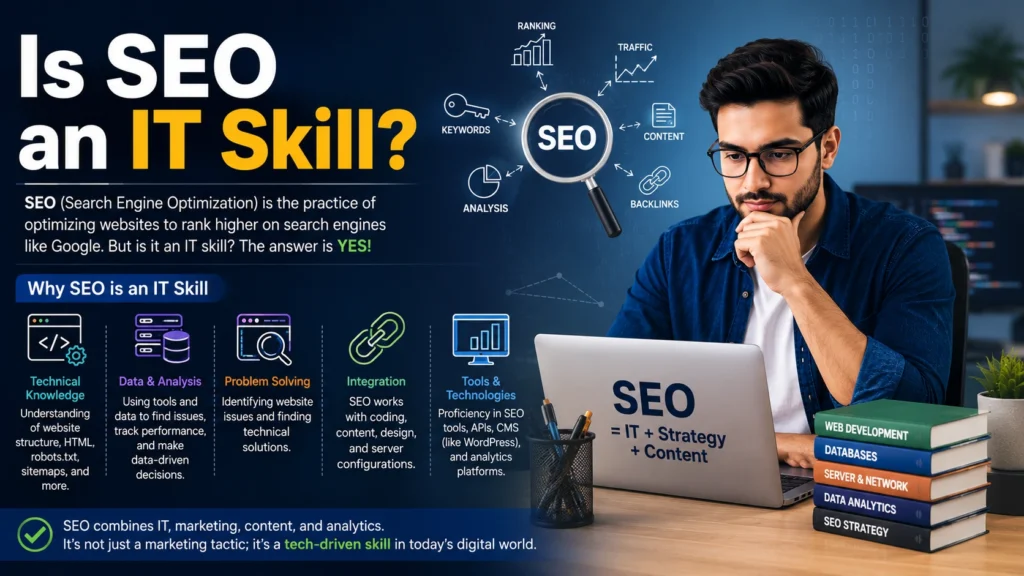
Is SEO an IT skill infographic showing technical knowledge, data analysis, problem solving, integration, and SEO tools

Is SEO an IT Skill? Everything You Need to Know

Yes and no. SEO borrows tools and logic from IT, but it leans more on writing, strategy, and human psychology than on coding. If you came here to check whether you need a computer science background before you touch a website, you can relax. Is SEO an IT skill? Not fully. It sits somewhere between marketing and technology, and that mix is exactly what makes it useful. What Is SEO? SEO stands for search engine optimization. It means shaping a website so search engines like Google can find it, understand it, and rank it for the right searches. At its core, SEO covers three areas. Technical SEO deals with how a site is built and how fast it loads. Content SEO deals with what the page says and how well it answers a searcher’s question. Off-page SEO deals with trust signals like links and mentions from other sites. None of these areas work alone. A fast site with weak content still fails. Great content on a broken site never gets seen. This is where the seo information technology overlap starts to matter, because the technical side needs at least a working knowledge of how websites run. Is SEO Considered an IT Skill? Here is a clear answer. Is SEO an IT skill in the traditional sense, like network administration or software development? No. It does not require a degree in computer science. But it does use IT concepts every single day. An SEO professional needs to understand how servers respond, how pages get crawled, and how code like schema markup helps search engines read a page. That is a technical layer sitting inside a marketing job. So when people search for it or not, the honest answer is both. SEO is a hybrid skill. It pulls from IT when the job touches site speed, indexing, or structured data. It pulls from marketing and writing when the job touches keywords, content, and user intent. Why SEO Has an IT Component Search engines are software. To rank well, your site has to speak a language that crawlers understand. That means working with things like site architecture, redirects, mobile rendering, and page speed. These tasks sit close to web development. An SEO specialist does not need to write full applications, but reading basic HTML, understanding how a content management system works, and knowing how to check server response codes are part of the job. This technical layer is why so many job listings blend seo information technology duties into one role. A mid-size company often expects one person to handle both the content strategy and the site health checks. That expectation is fair, since search rankings depend on both working together. SEO Skills You Need to Learn A strong seo skills definition includes far more than keyword research. Here is what actually matters for someone starting out. Keyword research: finding what your audience types into Google and matching content to that intent. On-page optimization: writing titles, headers, and body content that answer the search query clearly. Technical auditing: checking site speed, mobile usability, and crawl errors using tools like Google Search Console. Content strategy: planning topics that cover a subject in depth instead of publishing thin, scattered posts. Link building: earning mentions and backlinks from sites your audience already trusts. Data analysis: reading traffic reports to see what is working and what needs a fix. Notice that only technical auditing leans heavily on IT. The rest depends on research, writing, and judgment. This mix is exactly why seo skills development looks different for every person. A writer might need to learn basic HTML. A developer might need to learn how to write a headline people actually click. SEO vs. IT: What Is the Difference? IT, short for information technology, covers the setup and maintenance of computer systems, networks, and software. IT professionals manage servers, fix security issues, and build the infrastructure that websites run on. SEO uses that infrastructure but does not build it. An SEO specialist checks if a site loads fast, but an IT team is usually the one who fixes the server issue causing the slowdown. Is SEO an IT skill by this definition? It borrows tools from IT, like site audits and basic code checks, but the goal is different. IT keeps systems running. SEO makes sure the right people find those systems through search. Think of IT as the engine and SEO as the map that guides traffic to it. Do You Need an IT Degree to Learn SEO? No, you do not need an IT degree to learn SEO. Most SEO professionals come from marketing, journalism, business, or even completely unrelated fields. What matters more is curiosity and a willingness to test ideas. That said, a basic grasp of how websites work helps a lot. You do not need to code from scratch, but understanding terms like HTML, CSS, and page speed will make you faster at diagnosing problems. Many beginners start with free tools like Google Analytics and Search Console, then move on to guided courses once they see how the pieces connect. A formal IT background can speed up the technical side, but it is not required to start or succeed. Is SEO a Good Career Skill? Yes, and demand keeps growing. Every business with a website needs visibility in search results, and that need is not shrinking anytime soon. Is SEO an IT skill worth learning for career growth? Absolutely. It pairs well with content writing, digital marketing, web development, and even sales roles, since visibility often drives leads and revenue directly. Companies are also placing more weight on quality after Google’s December 2025 core update, which sharpened how Search rewards genuine expertise and real depth over shallow, templated pages. That shift means skilled SEO professionals who understand both content and technical health are more valuable now, not less. How to Learn SEO as a Beginner Learning SEO does not require years of study. Here is a simple path that works for most

Is SEO an IT Skill? Everything You Need to Know Read More »

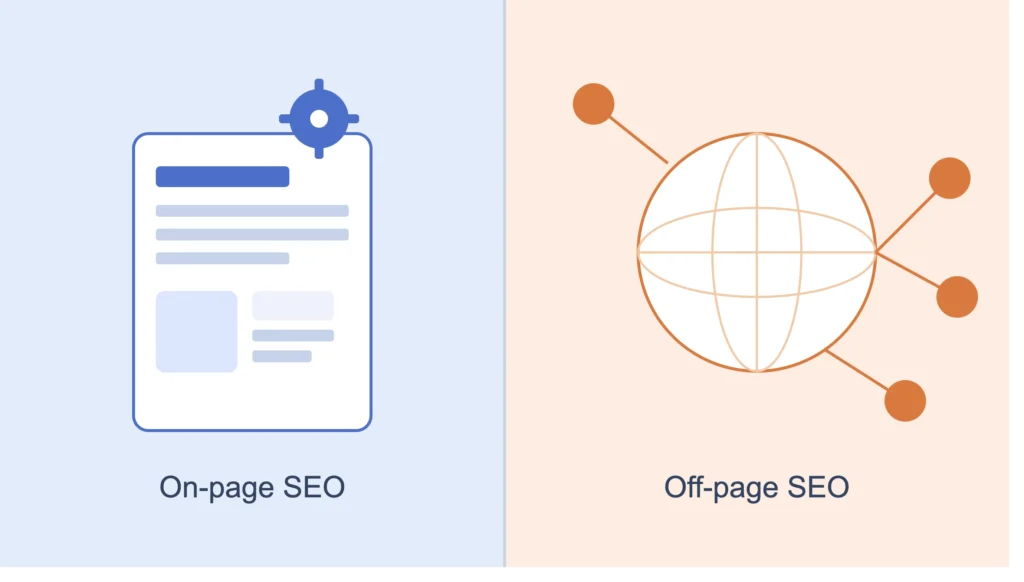
Diagram showing the two main parts of SEO: on-page SEO represented by a webpage with a target icon, and off-page SEO represented by a globe connected to backlink nodes.

What Are the Two Main Parts of SEO?

SEO can feel confusing when you first start a website or blog. You read guide after guide and still feel stuck on where to begin. Most articles make it sound harder than it really is. So, what are the two main parts of SEO? Every SEO strategy comes down to two core areas: on-page SEO and off-page SEO. Once you understand these two parts, everything else becomes much easier to manage.  At Localpro1 Institute, we teach businesses and beginners how to master both on-page and off-page SEO to build stronger search rankings, attract qualified traffic, and achieve long-term online growth. Why SEO Is Important for Websites Search engines send free traffic to your site every single day. That traffic keeps coming as long as your pages rank well for the right searches. Without SEO, even a great website stays invisible to the people who need it. Think about how you find information. You open Google, type a question, and click one of the first few results. Your future customers do the exact same thing. If your site is not there, someone else gets the click, the sale, or the sign-up. This is why SEO training matters so much right now. Skills like keyword research, content structure, and link building take time to learn well. If you want hands-on training from real practitioners, Localpro 1 Institute offers SEO courses in Islamabad that walk you through these skills step by step, from beginner basics to full campaign strategy. A website without SEO is like a shop with no sign on a busy street. People walk past it every day and never know it exists. SEO also builds trust over time. Pages that rank high tend to feel more credible to readers, even before they click. When your site shows up again and again for topics in your niche, visitors start to see your brand as a known name in that space. That kind of trust takes months to build, but it keeps paying off long after a single ad campaign ends. What Are the Two Main Parts of SEO? Here is the direct answer. The two main parts of SEO are on-page SEO and off-page SEO. Everything you do to rank higher on Google fits into one of these two buckets. On-page SEO covers everything you control directly on your website. This includes your content, titles, headings, images, internal links, and page speed. It is the work you do inside your own site. Off-page SEO covers everything that happens outside your website. This mainly means backlinks from other sites, but it also includes brand mentions, social signals, and reviews. It is the trust and reputation you build across the wider web. Both parts work together. Strong content with no backlinks struggles to rank against competitors. Plenty of backlinks pointing to thin, unhelpful pages will not save a weak site either. Google’s own core updates keep proving this point, including the large core update it rolled out in December 2025, which rewarded sites with strong page experience and real depth, and pushed down sites relying on shortcuts. On-Page SEO vs. Off-Page SEO: What’s the Difference? The easiest way to understand on-page SEO vs off-page SEO is to picture your website as a store. On-page SEO is how you set up the inside of that store. Off-page SEO is how people talk about your store once they leave it. On-page and off-page SEO explained simply: one lives inside your site, the other lives outside it. On-Page SEO Includes Keyword placement in titles, headings, and body text Clear, well-organized content that answers user questions Fast-loading, mobile-friendly pages Descriptive image alt text Internal links connecting related pages on your site Off-Page SEO Includes Backlinks from other trusted websites Guest posts and digital PR Social media shares and mentions Local citations and business listings Positive reviews on platforms like Google Business Profile Both parts need equal attention. A site with only on-page work often stalls in rankings once competitors start earning backlinks. A site with only off-page work can rank briefly, then drop once Google’s quality checks catch up with weak content. Types of SEO You Should Know Beyond the two main categories, it helps to know the different types of SEO you will run into as you learn. Technical SEO deals with your site’s backend, things like crawlability, site speed, and structured data. Local SEO focuses on ranking in map results and local search for nearby customers. Content SEO focuses on creating pages that genuinely answer what people are searching for. Each of these types still falls under either on-page or off-page work. Technical and content SEO sit mostly on the on-page side. Local citations and reviews often sit on the off-page side. Knowing this helps you organize your SEO tasks instead of feeling overwhelmed by long checklists. Simple SEO Checklist for Beginners If you are just starting out, keep your first few weeks focused on these basics: Pick one main keyword per page and use it naturally in your title and first paragraph. Write content that fully answers the question behind the search, not just a short summary. Use short paragraphs and clear headings so readers can scan easily. Add two or three internal links to other helpful pages on your site. Check your page speed and fix anything loading slower than three seconds. Set up a free Google Business Profile if you serve local customers. Reach out to a few relevant sites for guest posts or mentions once your content is solid. Small, steady steps like these build a strong foundation. You do not need every SEO optimization technique on day one. Start with the basics, then add more as your site grows. Common SEO Mistakes to Avoid Many beginners hurt their own rankings without realizing it. Watch out for these common mistakes: Keyword stuffing: Repeating a keyword unnaturally makes content hard to read and can trigger ranking drops. Ignoring page speed: Slow pages lose visitors and rank lower, especially on mobile devices.

What Are the Two Main Parts of SEO? Read More »

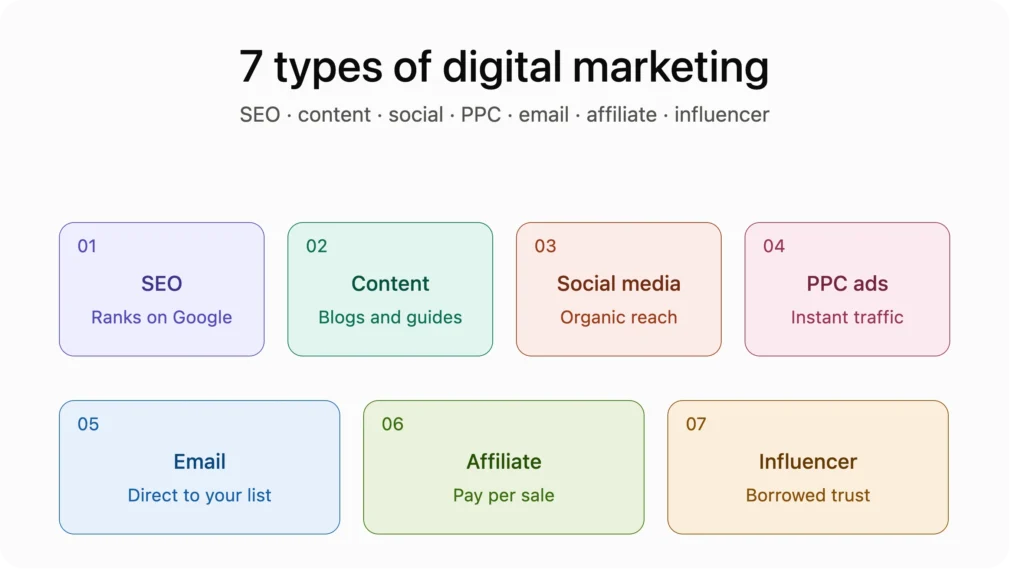
Infographic showing the 7 types of digital marketing: SEO, content, social media, PPC ads, email, affiliate, and influencer marketing.

What Are the 7 Types of Digital Marketing?

The 7 types of digital marketing are SEO, content marketing, social media marketing, email marketing, PPC advertising, affiliate marketing, and influencer marketing. Each one reaches your audience through a different channel, and most businesses need a mix of them to grow. So what are the 7 types of digital marketing, and which ones actually matter for you? This guide breaks down each type, how they work together, and where to start if you are new to the field. What Is Digital Marketing? Digital marketing is any marketing that happens through the internet or digital devices. It covers websites, search engines, social media, email, and paid ads. Instead of billboards and TV spots, digital marketing meets people where they already spend their time, on their phones and laptops. The biggest advantage over traditional marketing is measurement. You can see exactly how many people saw your ad, clicked your link, or bought your product. That data lets businesses improve campaigns in real time instead of guessing what worked. Most companies today run several digital channels at once rather than relying on just one. This is exactly why understanding what is digital marketing at a channel level matters before you pick a specialty or a career path. What Are the 7 Types of Digital Marketing? Here is a direct look at each of the 7 types of digital marketing and what each one does. 1. Search Engine Optimization (SEO) SEO improves your website so it ranks higher in Google search results without paid ads. It involves keyword research, quality content, fast page speed, and earning links from other trusted sites. SEO takes months to show results, but the traffic it brings tends to stay consistent and costs nothing per click once you rank. 2. Content Marketing Content marketing means creating useful material such as blog posts, videos, guides, and infographics that attract and educate your audience. It builds trust before someone even talks to a salesperson. Content marketing and SEO work closely together, since good content is what ranks in search results. 3. Social Media Marketing Social media marketing covers organic posts and paid promotion on platforms like Facebook, Instagram, TikTok, and LinkedIn. It helps brands build relationships, answer questions publicly, and show their personality. Different platforms suit different audiences, so picking the right one matters more than being everywhere at once. 4. Email Marketing Email marketing sends messages directly to people who already showed interest in your business. It remains one of the highest return channels because you own your email list, unlike a social media following that a platform controls. Newsletters, promotional offers, and automated welcome sequences all fall under this type. 5. PPC Advertising (Pay-Per-Click) PPC advertising places your ads on Google, YouTube, Facebook, or Instagram, and you pay only when someone clicks. It delivers fast, measurable traffic, which makes it useful for time-sensitive offers or new websites still waiting on organic SEO growth. Google Ads and Meta Ads are the two largest PPC networks used today. 6. Affiliate Marketing Affiliate marketing pays other people or websites a commission for sending customers your way. A blogger, YouTuber, or website owner promotes your product using a tracked link, and you pay them only when a sale happens. It shifts marketing risk onto performance instead of upfront spend. 7. Influencer Marketing Influencer marketing partners with people who already have an audience that trusts them. Instead of buying ad space, you pay or collaborate with an influencer to feature your product naturally in their content. It works especially well for reaching younger audiences who scroll past traditional ads. Together, these make up the core answer to what are the 7 types of digital marketing that most agencies and courses teach today. How Do the 7 Types of Digital Marketing Work Together? None of these channels perform their best alone. A typical customer journey touches three or four types before they buy anything. Someone might first find your blog post through SEO, read a few more articles through content marketing, then see your brand again on social media a week later. An email signup captures their interest, and a well-timed PPC ad brings them back when they are ready to buy. An influencer mention earlier in that journey might have planted the first seed of trust. This is why marketing teams build integrated strategies instead of picking one channel and ignoring the rest. Each of the 7 types of digital marketing services plays a specific role, and combining them covers more of the customer journey than any single channel can on its own. Which Type of Digital Marketing Is Best for Beginners? Content marketing and social media marketing are usually the easiest entry points. Both require creativity and consistency more than a large budget or advanced technical skill. Starting a blog, writing helpful posts, and sharing them on social platforms teaches you the core skills of understanding an audience and creating content people actually want. From there, adding basic SEO knowledge and simple email campaigns rounds out a strong beginner skill set. PPC and paid social ads are better learned once you understand organic strategy first, since running paid campaigns without a foundation often wastes budget on trial and error. Which Type of Digital Marketing Is Most Effective? There is no single winner among what are 7 marketing types, since effectiveness depends on your goal, budget, and audience. That said, a few patterns hold up consistently. SEO tends to deliver the highest quality leads over time because it captures people who are already searching for a solution. PPC wins when you need results immediately, such as a product launch or seasonal sale. Email marketing consistently shows strong returns because you are reaching people who already know your brand. Social media and influencer marketing excel at building awareness and trust with new audiences before they are ready to buy. The most effective approach for most businesses combines SEO and content marketing for long-term growth, with PPC and social media filling in short-term gaps while

What Are the 7 Types of Digital Marketing? Read More »

Person creating a new blog on a laptop using a blogging platform like WordPress

How to Create a Blog? Step-by-Step Guide for Newbies

Starting a blog takes four basic steps: pick a niche, choose a platform, buy hosting, and publish your first post. You can have a live blog running in under an hour with the right setup. No coding skills are needed to get started today. So how to create a blog if you’ve never built a website before? This guide breaks it down step by step, from your first decision to your first published post. What Is a Blog? A blog is a website where you share articles or stories on a topic you care about. Think of it as an ongoing journal anyone online can read. Blogs can cover almost anything. Food, travel, finance, tech, and parenting are all common niches. Some are hobbies. Others turn into full businesses that earn real income. Unlike a static website, a blog gets updated often. New posts keep readers coming back and give Google fresh content to crawl. Why Should You Start a Blog? A blog gives you a space to share what you know with people who want to read it. It also builds your credibility in your field over time. Blogging can open doors you don’t expect. Many bloggers land freelance work, brand deals, or job offers from their writing. A well-run blog can also become a real income source through ads, affiliate links, or your own products. Step 1: Choose Your Blog Niche Your niche is the main topic your blog will cover. Pick something you know well and can write about for years without getting bored. Balance your interest with demand. A niche with zero search interest will struggle to grow. Use free tools like Google Trends or Ubersuggest to check if people are actually searching for it. Narrow niches often perform better than broad ones. “Budget travel for solo women” will rank easier than a general travel blog with no clear focus. Step 2: Choose a Blogging Platform Your platform is the software that runs your blog. WordPress.org powers most professional blogs because it’s flexible, free, and fully yours to control. Other options exist too. Wix and Squarespace are easier for beginners but offer less control. Medium and Substack work well for writers who don’t want to manage a website at all. If you’re serious about growing traffic and income, learning how to create a WordPress blog is usually the smartest choice. Step 3: Buy a Domain Name Your domain name is your blog’s address, like yourblogname.com. Pick something short, easy to spell, and easy to remember. Avoid numbers, hyphens, and hard-to-spell words. Try to match your domain to your niche so visitors know what to expect before they click. Domain registrars like Namecheap or GoDaddy sell domains for around ten to fifteen dollars a year. Some hosting companies throw in a free domain for your first year. Step 4: Choose Reliable Web Hosting Hosting is the service that stores your blog’s files and makes it visible online. Without hosting, your blog won’t load for visitors. Look for hosting with strong uptime, fast loading speed, and real customer support. Slow hosting hurts both user experience and your Google rankings. Popular beginner-friendly hosts include Hostinger, Bluehost, and SiteGround. Most offer one-click WordPress installs, which makes setup much simpler. Step 5: Install WordPress Once your hosting is active, installing WordPress usually takes just a few clicks from your hosting dashboard. Look for a “WordPress” or “one-click install” option in your hosting panel. Fill in your site name, username, and password, then wait a few minutes for the install to finish. After installation, you’ll get a login link ending in /wp-admin. This is where you’ll manage your entire blog. Step 6: Pick a Blog Theme Your theme controls how your blog looks and feels. Choose one that’s clean, fast-loading, and mobile-friendly, since most readers browse on their phones. Free themes like Astra, GeneratePress, and Neve work well for most new blogs. Avoid themes packed with flashy animations and heavy sliders. They often load slowly and hurt both rankings and reader experience. Step 7: Install Essential WordPress Plugins Plugins add extra features to your blog without needing to code anything yourself. A few plugins matter most for new bloggers. Yoast SEO or Rank Math help you optimize each post. WP Super Cache speeds up your site. UpdraftPlus backs up your content automatically. Keep your plugin list small at first. Too many plugins can slow your site down and create conflicts you don’t need early on. Step 8: Create Important Pages Before you publish your first post, set up a few core pages. An About page tells readers who you are and why they should trust you. A Contact page makes it easy for readers or brands to reach you. A Privacy Policy page is required if you use ads, analytics, or collect visitor data. These pages also support your E-E-A-T signals with Google by showing real experience and clear transparency behind your blog. Step 9: Write Your First Blog Post Pick a topic your future readers are actually searching for, not just something you feel like writing. Use a free tool like Google’s autocomplete to find real questions people ask. Write a clear headline and answer the reader’s main question early in the post. Break your content into short paragraphs and use headings so it’s easy to scan. Add one or two images to break up the text. A post with only walls of text tends to lose readers fast. Step 10: Publish and Promote Your Blog Hitting publish is just the start. Share your post on social media, relevant Facebook groups, and any newsletter list you have. Submit your blog to Google Search Console so your pages get indexed faster. This also lets you track which posts are getting clicks and impressions. Consistency beats intensity here. Posting one solid article a week for six months will outperform ten posts in a month followed by silence. Essential SEO Tips for New Bloggers Once you know how to create a blog, the

How to Create a Blog? Step-by-Step Guide for Newbies Read More »

Woman in beige embroidered kurta working on a silver laptop at a wooden desk, with a stylus tablet, steaming mug, notebook, and headphones nearby, sunlit room with sheer curtains.

What Are the Best Sources for Online Courses in Pakistan?

The best sources for online courses in Pakistan include global platforms like Coursera, Udemy, and edX, along with local providers such as DigiSkills.pk and Localpro 1 Institute. These platforms cover tech, business, design, and language skills. Most offer video lessons, practice tests, and certificates that help you build real, job-ready skills. So what are the best sources for online courses in Pakistan when you have dozens of choices? It comes down to your goals, your budget, and how you like to learn. This guide walks you through your best options. Why Online Courses Are Popular in Pakistan Internet access in Pakistan has grown fast over the last five years. More students and working adults now have a smartphone or laptop at home. This has opened the door to online learning in a big way. Many young people in Pakistan want to freelance or work remotely. Online courses give them a way to learn coding, digital marketing, or graphic design without paying for a full degree. Universities are expensive, and seats are limited. Online courses fill that gap at a much lower cost. Online courses also let people learn at their own pace. A student in Lahore can study at night after classes. A mother in Karachi can learn a new skill between household tasks. This kind of flexibility is hard to find in a traditional classroom. What to Look for in an Online Learning Platform Not every course site delivers real value. Before you pick one, check a few basic things first. Look at who teaches the course. Real experts with industry experience teach better than someone reading off slides. Check student reviews and ratings before you pay for anything. A platform with thousands of honest reviews is usually safer than one with none. Check if the certificate holds any weight. Some certificates matter to employers. Others are just for your own record. Also look at customer support. If you get stuck on a lesson, you want a real person or forum to help you, not silence. Price matters too. Some platforms charge per course. Others use a monthly subscription. Pick the pricing model that fits how much you plan to study. Best Sources for Online Courses in Pakistan Here are the best online learning platforms in Pakistan that students and professionals actually use. Localpro 1 Institute Localpro 1 Institute offers hands-on, locally focused training with direct mentor support, which many students in Pakistan prefer over faceless global platforms. Coursera Coursera partners with top universities like Stanford and Yale. It offers full degree programs along with short courses in data science, business, and health. Many courses are free to audit, and you pay only if you want the certificate. Udemy Udemy is one of the most popular online course websites in Pakistan for practical, skill-based learning. You can find courses on web development, video editing, and digital marketing, often at very low prices during sales. DigiSkills.pk DigiSkills.pk, run by the Government of Pakistan, offers free courses in freelancing, e-commerce, and digital marketing. This is one of the best free options if you’re new to online learning. Best Online Course Platforms by Learning Goal When people ask what are the best sources for online courses in Pakistan, the honest answer depends on what you’re trying to learn. For Coding and Tech Skills Try freeCodeCamp, Udemy, or edX. freeCodeCamp is completely free and covers web development from scratch. For Business and Marketing Coursera and LinkedIn Learning offer strong programs from real companies like Google and IBM. For Freelancing Skills DigiSkills.pk and Localpro 1 Institute both focus on skills that match what freelance clients actually pay for. For Languages Duolingo and Cambridge English platforms work well for building English or other language skills from zero. Pick a platform based on your goal, not just what’s popular. A general marketing course won’t help you much if you actually want to learn graphic design. Free vs Paid Online Courses in Pakistan If you’re wondering where to study online in Pakistan without spending money, free courses are a solid starting point. DigiSkills.pk, freeCodeCamp, and audit versions of Coursera courses cost nothing and still teach real skills. Free courses work well when you’re testing a new field. They help you decide if you actually enjoy the subject before you spend money. Paid courses usually offer more structure, direct feedback, and a certificate that carries weight. If you plan to use the skill for a job or freelance work, a paid course from a trusted source is often worth the cost. Many paid courses also include community support, live sessions, and project reviews that free versions skip. A good approach is to start free, then invest in a paid course once you know the field is right for you. Are Online Course Certificates Accepted in Pakistan? This is one of the most common questions students ask. The short answer is that it depends on the certificate and the employer. Certificates from Coursera, edX, and Google Career Certificates carry real weight with many companies, especially in tech and marketing roles. Freelance clients on Upwork or Fiverr often care more about your portfolio than your certificate anyway. For government jobs or university admissions in Pakistan, a short online course certificate usually won’t replace a formal degree. But it can still support your application by showing you took initiative to learn a skill on your own. If your goal is a corporate job, check what certificates that company or industry values before you enroll. A quick search or a message to someone already working in that field can save you time and money. How to Choose the Right Online Course Start by writing down your actual goal. Do you want a new job, a side income, or just a new hobby? Your goal decides which course and platform make sense. Next, check the instructor’s background. A course taught by someone with real work experience is usually better than one taught by a general trainer. Read a few reviews and watch

What Are the Best Sources for Online Courses in Pakistan? Read More »

What Are Digital Marketing Tools

What Are Digital Marketing Tools? | Complete Guide

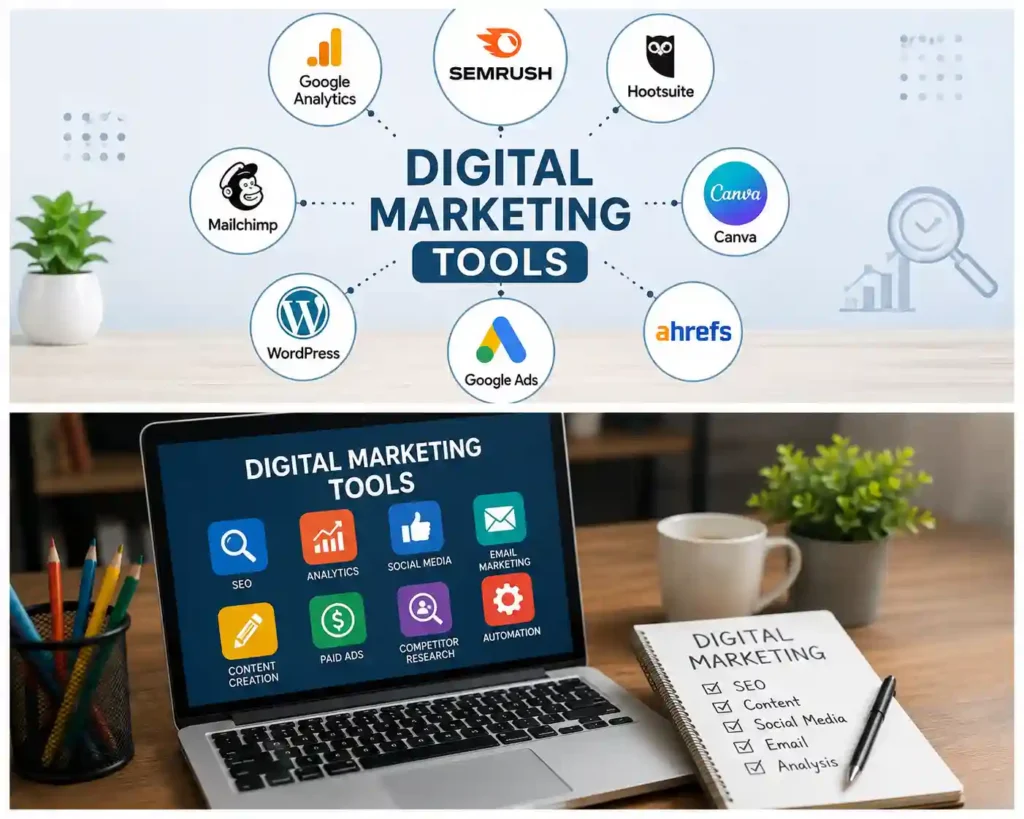
Digital marketing tools are software programs, web applications, and online platforms that help businesses promote products, manage campaigns, and track performance. These technologies streamline complex tasks like email delivery, search engine optimization, and social media scheduling. Marketing teams rely on these applications daily to reach targeted audiences and analyze customer behavior across online channels. If you want to know what are digital marketing tools, they are essential systems that automate routine tasks and provide data insights. They turn raw audience data into clear growth strategies. This guide explains how these tools function, why they matter, and how to select the best options. What Are Digital Marketing Tools? The exact answer to what are digital tools in marketing starts with understanding how modern businesses connect with online consumers. A digital marketing tool is any technology asset that helps plan, execute, analyze, or optimize online promotional activities. These solutions handle everything from sending bulk newsletters to tracking website visitor pathways. When people ask what are the tools used in digital marketing, they are referring to a broad software ecosystem. These tools replace manual work with automated workflows. Instead of manually posting content across five social platforms, marketers use scheduling tools to publish updates automatically. Modern digital tools also collect performance metrics in real time. They measure clicks, page views, sales conversions, and customer interactions. Having direct access to this data allows marketing teams to improve campaigns quickly without guessing what works. Why Are Digital Marketing Tools Important? Online channels generate vast amounts of consumer data every second. Managing these data streams manually is impossible for small teams and growing companies. Software tools organize this information into actionable business insights. Marketing software creates consistent customer experiences across multiple channels. Consumers expect brands to respond quickly on social media, deliver relevant email offers, and maintain fast websites. Digital applications make it possible to meet these expectations consistently. Furthermore, these platforms level the playing field for small businesses. A local business can use affordable software tools to run targeted local ads and rank on search engine results pages. Technology allows smaller teams to compete effectively against larger brands. Benefits of Using Digital Marketing Tools Using specialized software offers clear operational advantages for businesses of any size. Higher Productivity: Automated workflows handle repetitive tasks like sending welcome emails, publishing social posts, and building weekly reports. Accurate Data Insights: Analytics platforms track exact customer actions, showing which campaigns generate actual revenue. Better Audience Targeting: Ad and email software allows businesses to send tailored messages based on user locations, interests, and past purchases. Clear Cost Control: Built-in budget limits in advertising tools prevent accidental ad overspends while maximizing return on investment. Improved Team Collaboration: Shared platforms keep remote teams, freelancers, and managers aligned on campaign schedules and goals. Types of Digital Marketing Tools To build a strong technology stack, you must understand the basic categories of software available today. Here are the core categories used by modern teams. Search Engine Optimization (SEO) Tools SEO applications help websites rank higher on search engines like Google. They identify low-competition keywords, discover technical site errors, and monitor competitor backlinks. Content Marketing and Writing Tools These applications assist with topic research, editorial planning, and content creation. They help creators structure articles, check grammar, and optimize text for search intent. Social Media Management Platforms Social tools unify multiple social channels into a single dashboard. Users can schedule posts, respond to reader comments, and analyze post engagement across networks. Email Marketing and Automation Software Email platforms manage subscriber lists, build visually appealing newsletters, and send automated email sequences based on user actions like cart abandonment. Pay-Per-Click (PPC) and Advertising Tools Ad platforms manage paid campaigns on search engines and social media networks. They help set ad budgets, test creative options, and measure conversion costs. Web Analytics and Data Platforms Analytics tools monitor visitor activity on your website. They show where traffic originates, which pages perform best, and where users drop off during checkout. Best Digital Marketing Tools in 2026 Selecting reliable software depends on your specific goals, team size, and budget. Here are widely trusted platforms across key categories. Semrush Semrush is a complete SEO and market research platform. It helps users analyze keyword search volume, track keyword rankings daily, and audit technical site health. HubSpot HubSpot provides an all-in-one marketing, sales, and customer service hub. It excels at managing customer databases, tracking sales leads, and running automated email campaigns. Google Analytics 4 (GA4) GA4 is a free analytics tool that tracks website traffic and app usage. It offers deep insights into user behavior, event tracking, and conversion pathways. Canva Canva is a user-friendly graphic design platform. It allows non-designers to create social media graphics, display ad banners, and marketing presentations quickly using templates. Buffer Buffer is a simple social media management tool. It lets users queue posts across multiple social profiles and analyze engagement metrics from a central dashboard. Mailchimp Mailchimp offers accessible email marketing features for growing businesses. It includes pre-built email templates, audience segmentation tools, and basic automation sequences. Free vs Paid Digital Marketing Tools Choosing between free and paid software depends on your operational scale and growth plans. Both options serve distinct roles in a business strategy. Free tools work well for solopreneurs, startups, and small local businesses. Platforms like Google Search Console, Google Analytics, and free tiers of Canva offer essential features without monthly fees. They help users learn core marketing principles while building initial online traction. However, free tools usually limit data history, export options, and team user seats. As your business grows, these limitations create operational bottlenecks. Paid tools unlock advanced features like deep competitor intelligence, unlimited automated workflows, and custom reporting. Investing in premium platforms pays off through time saved and deeper strategic insights. Features to Look for in Digital Marketing Tools Before buying any marketing software, evaluate options against these essential feature requirements. Ease of Use: Software should have a clean interface that your team can learn without weeks of technical training. Integration Support:

What Are Digital Marketing Tools? | Complete Guide Read More »

Woman at a wooden desk reviewing a data dashboard with charts and graphs on a large monitor, notebook and coffee nearby.

Is SEO Difficult to Learn?

SEO is not difficult to learn, but it takes patience to master. The basics, like keywords, titles, and links, click within a few weeks. Advanced skills, like technical audits and content strategy, take longer to build real confidence in. Most beginners quit too early because they expect fast results. Is SEO Difficult to Learn? Not really. Focus on one skill at a time and practice on a real website to build experience. If you want structured guidance and practical training, Localpro 1 Institute helps beginners learn SEO with hands-on projects and real-world techniques. What Is SEO? SEO stands for search engine optimization. It’s the process of improving a website so it ranks higher in search results. When done well, it brings more visitors to your site without paying for ads. SEO covers a few main areas. On-page SEO deals with your content, titles, and headings. Technical SEO covers site speed, mobile design, and how search engines crawl your pages. Off-page SEO focuses on links and mentions from other sites. Search engines like Google use hundreds of signals to decide rankings. That sounds overwhelming, but most beginners only need to understand a handful of core principles to start seeing progress. Is SEO Difficult to Learn? The short answer is no, not if you start with the fundamentals. SEO for beginners looks intimidating because of all the jargon, but the core ideas are simple. Search engines want to show helpful, trustworthy content to users. Your job is to create content that answers real questions clearly, then structure it so search engines can understand it. What makes SEO feel hard is the constant change. Google updates its ranking system often, and strategies that worked two years ago may not work today. This means learning SEO is ongoing, not a one-time task. If you’re still asking is SEO difficult to learn, think of it like learning to cook. The basic techniques are easy to pick up. Getting really good takes repeated practice and paying attention to what works. What SEO Skills Should Beginners Learn First? Start with these core skills before moving to anything advanced: Keyword research, so you know what your audience is searching for On-page optimization, including titles, headings, and meta descriptions Basic content writing, focused on answering user questions clearly Internal linking, connecting related pages on your own site Basic technical checks, like page speed and mobile friendliness Understanding analytics, so you can track what’s working Once these feel natural, you can move into link building, technical audits, and content strategy. How to Learn SEO Step by Step Here’s a clear path for how to learn SEO step by step, without feeling lost. Step one: learn the vocabulary. Understand terms like backlinks, meta tags, and crawl budget before diving into strategy. Step two: study one real website. Pick a site, run it through a free SEO tool, and see what the report shows you. Reading real data teaches more than theory alone. Step three: practice on your own site or a test blog. Write a post, optimize the title and headings, then track how it performs over a few weeks. Step four: learn technical basics. Understand how site speed, mobile design, and clean site structure affect rankings. Step five: study Google’s own guidance. Google publishes helpful documentation on ranking systems and content quality. This keeps your knowledge current. Following these steps in order builds a strong foundation without overwhelming you with too much at once. Can You Learn SEO by Yourself? Yes, you can learn SEO by yourself, and many professionals in the field are self-taught. The information is out there for free, from official search engine documentation to industry blogs. That said, learning alone takes discipline. Without a course or mentor, you need to seek out reliable sources and avoid outdated advice. SEO changes fast, and some free guides online are years behind current best practices. If you’re wondering can I learn SEO by myself, the answer depends on your learning style. Self-directed learners who enjoy research often do well. If you prefer structure and feedback, a paid course might get you there faster. Best Free Resources to Learn SEO You can build a solid SEO foundation without spending money. Here are trustworthy places to start: Google Search Central is Google’s own documentation on how search works. It’s the most reliable source since it comes directly from the platform you’re optimizing for. Free tools like Google Search Console let you see how your own site performs in search results. Hands-on data teaches you faster than reading alone. Industry blogs from established SEO companies publish free guides on keyword research, technical SEO, and content strategy. YouTube tutorials walk through real SEO audits and strategies step by step, which helps visual learners understand the process. Online communities and forums let you ask questions and see real problems other beginners are solving. Free resources cover most of what a beginner needs. If you want structured training with feedback, a paid course adds real value. Best Paid SEO Courses Paid courses give you a clear curriculum, expert feedback, and often a certificate to show employers or clients. That structure helps if you find free content scattered and hard to follow. Several online platforms offer well-reviewed SEO courses covering keyword research, technical audits, and content strategy. These work well if you’re comfortable learning through video at your own pace. If you prefer hands-on training with direct feedback from an instructor, local institutes are worth considering. For example, if you’re searching for SEO courses in Islamabad, Localpro 1 Institute offers structured training that covers keyword research, on-page optimization, and technical SEO with real practice projects. Learning in a classroom setting, with a trainer answering your questions directly, often helps beginners avoid common mistakes and build confidence faster than self-study alone. Paid courses work best once you understand the basics and want to sharpen specific skills or prepare for a job. How Long Does It Take to Learn SEO? Most beginners understand the basics within two

Is SEO Difficult to Learn? Read More »